For live iPhone dictation into Messages, Mail, or Notes, start with Apple Dictation for free built-in voice typing, Superwhisper for local-capable cross-app dictation, or Wispr Flow for cloud AI-polished writing. Choose VoiceScriber for private offline recordings and imported audio with searchable transcripts, not a keyboard replacement. Google AI Edge Eloquent is a free standalone alternative for in-app dictation and polishing.
For the broader category, compare free, paid, and offline iPhone voice-to-text apps. If keeping the original audio is your priority, see iPhone voice recorders that save audio and transcripts together.
Best private offline dictation workflow for iPhone
VoiceScriber is our pick for private offline dictation when you want saved audio and a searchable transcript. Record up to 90 minutes or import M4A, MP3, or WAV files for on-device transcription. It is free to try, with a $49.99 lifetime option, but is not a system-wide keyboard replacement.
What type of dictation app do you need?
“Dictation app” now covers four different jobs. Pick the workflow first, then compare price, privacy, and language support.
| Workflow | Best starting options | What you get |
|---|---|---|
| Speak into Messages, Mail, Notes, or another text field | Apple Dictation, Superwhisper, Wispr Flow | Text appears in the app you are already using |
| Record a long note and keep the audio | VoiceScriber, Whisper Notes, Just Press Record | A saved recording plus a reusable transcript |
| Transcribe an existing recording | VoiceScriber, Eloquent, Whisper Notes, Aiko | File import instead of live speech only |
| Rewrite and polish rough speech | Eloquent, Superwhisper, Wispr Flow | Filler-word removal, restructuring, or tone formatting |
Quick comparison: the best iPhone dictation apps
| App | Best for | Into other apps? | Keeps audio? | Offline path? | Current US price |
|---|---|---|---|---|---|
| Apple Dictation | Free text-field dictation | Yes | No | Many supported configurations | Free |
| VoiceScriber | Private recording plus transcription | Copy or export | Yes | Yes, on-device | $5.99 weekly or $49.99 lifetime |
| Eloquent | Free in-app AI dictation | Not yet | Dictation history; confirm audio retention | Core features after model setup | Free |
| Superwhisper | Cross-app formatted dictation | Yes | Recording history | Local speech models; check AI rewriting separately | Free local speech models; $249.99 lifetime |
| Wispr Flow | Cloud AI-polished typing | Yes | Not an audio archive | No | Free iPhone tier: 550-word soft / 750-word hard weekly threshold; paid plans |
| Whisper Notes | Offline files and recordings | No system-wide iPhone keyboard | Yes | Yes | $7.99 one-time |
| Just Press Record | Apple Watch capture | No | Yes | Depends on Apple Speech | $6.99 one-time |
| Aiko | Existing-audio transcription | No | Uses recorded files | Yes, local Whisper | $24 one-time |
What is the best free dictation app for iPhone?
Apple Dictation is the best completely free built-in option. Google AI Edge Eloquent is the strongest free standalone AI dictation app.
Apple Dictation works directly in standard text fields. Apple says many languages work on-device without internet. Check Settings > General > Keyboard > About Dictation & Privacy for your setup: other configurations can use Apple servers, and dictated searches may go to the search provider.
Eloquent records inside its own app, uses local Gemma models for core transcription and polishing, supports 15 dictation languages, imports audio and video, and currently has no published usage or recording-length cap. Its keyboard is still marked as coming soon, and some optional features require internet.
The eight best dictation apps for iPhone
1. Apple Dictation: best free built-in dictation app
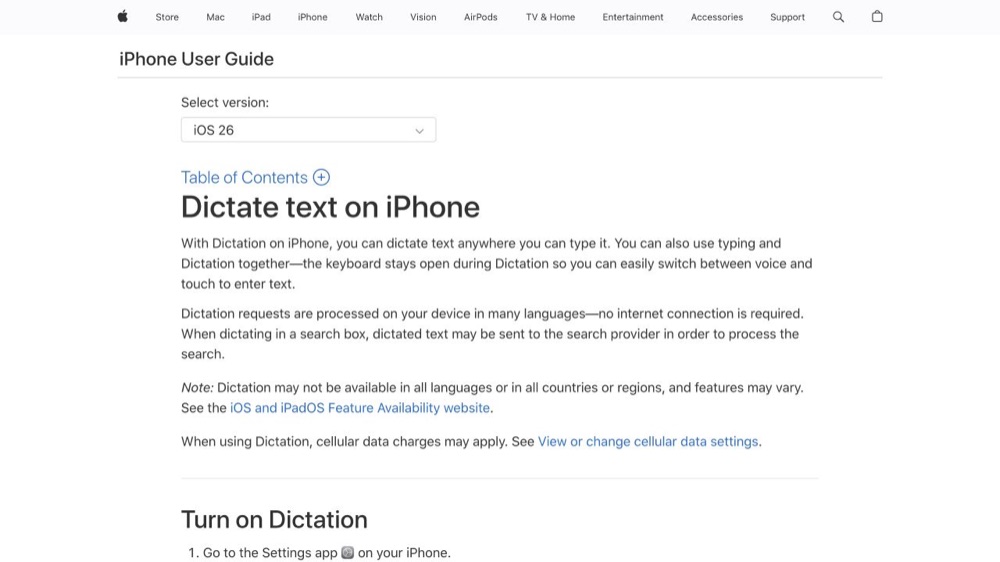
Best for: Messages, emails, forms, searches, and quick notes when the original audio does not matter.
Apple Dictation is built into the keyboard and places text into standard fields. Apple says Dictation runs on-device in many languages. Its Dictation privacy guidance explains how Keyboard Settings indicates local processing and when Apple servers can apply. Choose it for immediate text entry, not saved audio, imports, or a transcript library.
2. VoiceScriber: best private offline record-first app
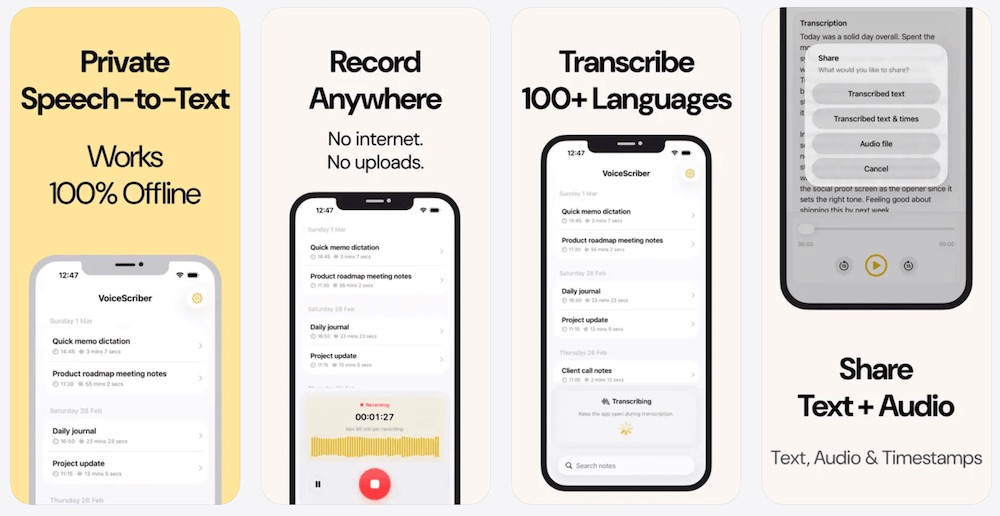
Best for: Long notes, meetings, lectures, interviews, journals, fieldwork, and imported recordings that should stay on the iPhone.
VoiceScriber is not a system-wide keyboard. It records or imports audio, begins transcription during recording, and keeps the original audio with an editable, searchable transcript. Its App Store listing documents on-device processing, Airplane Mode, 100+ languages, background recording, and up to 90 minutes per recording. Import M4A, MP3, or WAV files when you already have the audio. The current App Store privacy label says Data Not Collected.
Price: Free to try, $5.99 weekly, or $49.99 lifetime. Choose it when audio retention, imports, private search, or offline processing matters.
3. Google AI Edge Eloquent: best free standalone offline AI dictation
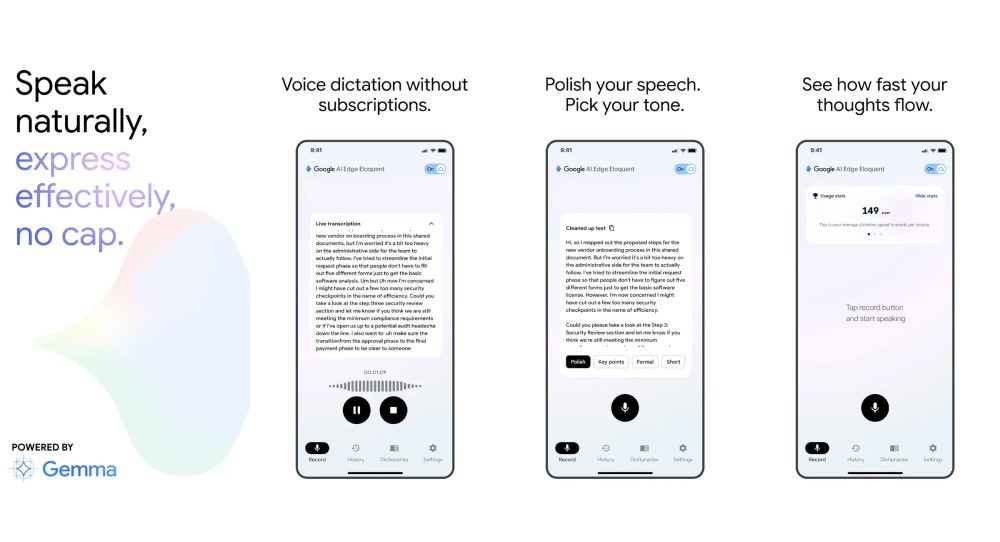
The current App Store listing says core processing runs locally after model download, and the app is free with no usage limit. It supports 15 languages, imports audio and video, preserves original text, and has no current recording-length cap. Its keyboard is not yet available, and optional features can require internet.
4. Superwhisper: best local-capable cross-app dictation
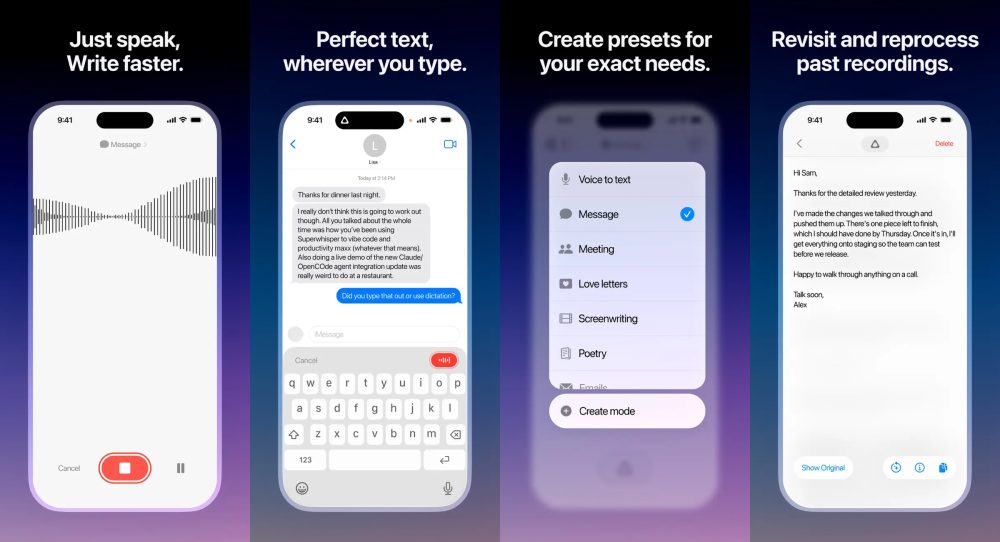
Superwhisper places polished text into other apps, supports 100+ languages, searches recording history, and offers custom modes. Its model documentation lists Fast, Nano, and Standard as free on-device speech models. Local speech recognition does not automatically make AI rewriting local: cloud language models can receive the transcript, while documented local language models are for Apple Silicon and Windows. The US iPhone listing shows $8.49 monthly, $84.99 annually, and $249.99 lifetime.
5. Wispr Flow: best cloud AI-polished dictation
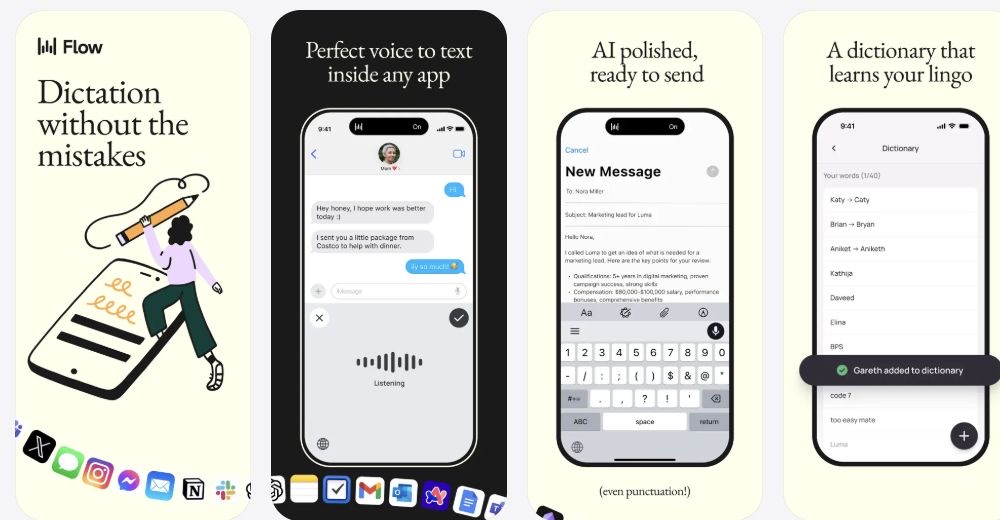
Wispr Flow removes filler words, adapts tone, and formats text for the active field. Its Data Controls documentation says transcription always occurs in the cloud. Model-improvement and Dictation Cloud Storage settings are separate controls; neither makes processing local. The Free-plan iPhone thresholds are 550 words per week, when dictation can slow, and a hard stop at 750 words. See our Wispr Flow pricing and student-plan guide for paid options, or compare open-source and offline Wispr Flow alternatives for Android, Windows, Mac and Linux.
6. Whisper Notes: best low-cost offline recorder and file transcriber
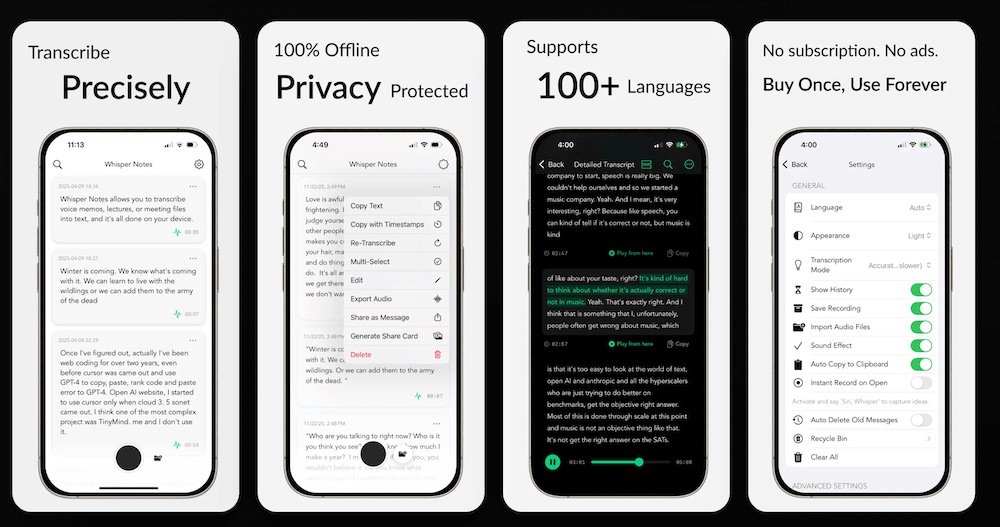
Whisper Notes runs on-device, supports 100+ languages, imports MP3, M4A, and WAV files, and provides speaker labels. On iPhone it records first and transcribes afterward. The US iPhone and iPad listing costs $7.99 once, not a free iPhone tier.
7. Just Press Record: best for Apple Watch capture
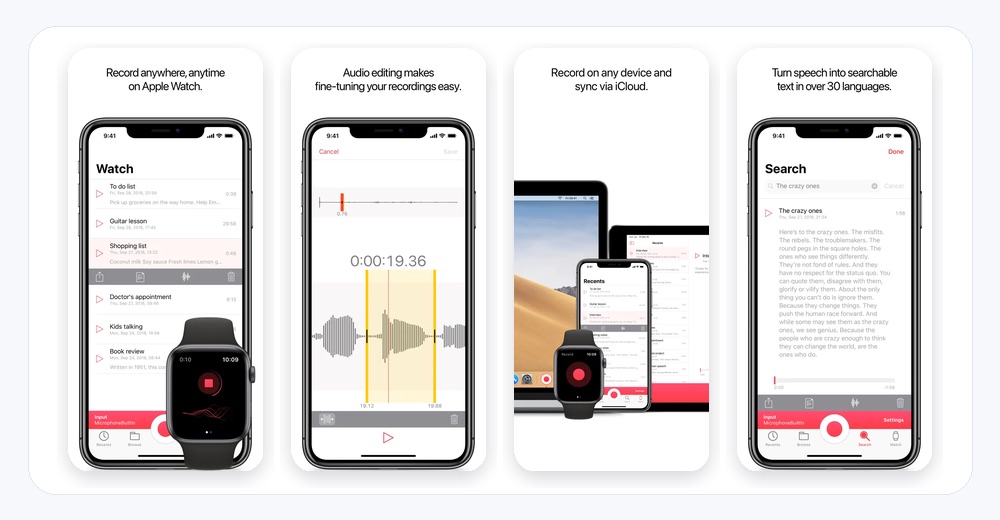
Just Press Record costs $6.99 and offers background recording, searchable transcripts, synchronized playback, 30+ transcription languages, and local or iCloud storage. Its privacy policy says Apple Speech can upload audio to Apple for processing depending on device capabilities and language. Local file storage alone does not guarantee offline transcription.
8. Aiko: best private app for existing audio
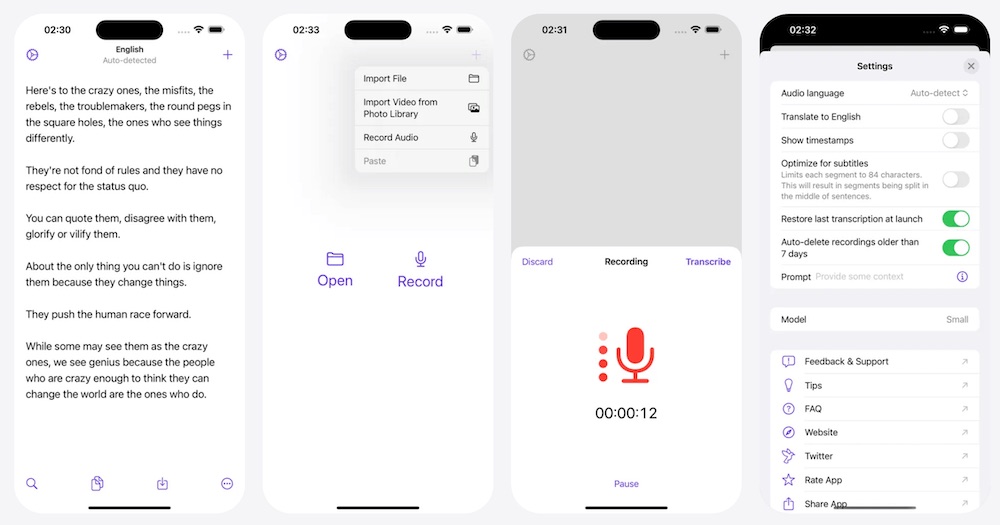
Aiko runs Whisper locally, supports 100 languages, and says nothing leaves the device. It costs $24 and can export subtitles, but does not provide live transcription or speaker detection.
Live dictation versus record-first transcription
Live dictation creates text for immediate insertion. Record-first transcription preserves audio and creates a transcript that can be searched, edited, exported, or reviewed later.
- Live and cross-app: Apple Dictation, Superwhisper, Wispr Flow.
- Record-first: VoiceScriber, Whisper Notes, Just Press Record.
- Existing-file first: Aiko.
- Hybrid standalone: Eloquent combines in-app dictation, rewriting, history, and imports.
Which apps actually work offline?
| Category | Apps | Meaning |
|---|---|---|
| Fully local transcription | VoiceScriber, Whisper Notes, Aiko | Official documentation describes on-device transcription without a cloud server |
| Local core or selected modes | Eloquent, Superwhisper | Core or selected models can be local, while optional modes can use cloud services |
| Supported configurations | Apple Dictation, Just Press Record | Behavior depends on language, device, or Apple Speech |
| Cloud-dependent | Wispr Flow | The vendor says transcription always occurs in the cloud |
Saving audio offline is not the same as producing the transcript offline. Confirm that usable text appears before reconnecting when offline processing is essential.
Privacy comparison
| App | Processing | Important detail |
|---|---|---|
| VoiceScriber | On-device | Current App Store privacy label says Data Not Collected |
| Whisper Notes and Aiko | On-device | Documented local transcription |
| Eloquent and Superwhisper | Local plus optional cloud paths | Review feature and model settings |
| Apple Dictation and Just Press Record | Configuration-dependent | Apple servers can apply |
| Wispr Flow | Cloud | Storage controls do not change processing location |
Pricing and no-subscription options
| App | Free access | Paid option |
|---|---|---|
| Apple Dictation | Included with iOS | $0 |
| Eloquent | No published usage limit | $0 |
| Just Press Record | No | $6.99 once |
| Whisper Notes | No free iPhone tier | $7.99 once on iPhone and iPad |
| Aiko | Trial available | $24 once |
| VoiceScriber | Free to try | $5.99 weekly or $49.99 lifetime |
| Superwhisper | Fast, Nano, and Standard local speech models | $8.49 monthly, $84.99 annually, or $249.99 lifetime |
| Wispr Flow | iPhone: 550-word soft / 750-word hard weekly threshold | Subscription plans |
Prices are current US figures and can change or vary by country. See our guide to iPhone speech-to-text apps with lifetime or one-time pricing for more no-subscription choices.
Best dictation app by use case
- Messages and email: Apple Dictation, Superwhisper, or Wispr Flow.
- Long private notes: VoiceScriber.
- Free long-form AI dictation: Eloquent.
- Meetings and lectures: VoiceScriber or Whisper Notes.
- Existing recordings: Aiko or VoiceScriber.
- Apple Watch capture: Just Press Record.
What happened to Dragon Anywhere?
Dragon Anywhere is no longer a current recommendation for new buyers. Its App Store version history says new subscriptions and renewals ended on July 1, 2026.
Choose Superwhisper or Wispr Flow for cross-app professional dictation, Apple Dictation for free text entry, VoiceScriber for private recorded notes, Aiko or Whisper Notes for existing audio, and Eloquent for free standalone AI dictation.
Other apps considered
Spokenly also offers local and online speech models. Willow is another cross-app AI keyboard. Letterly documents offline recording with transcription after reconnecting, which is not the same as offline speech-to-text.
FAQs
What is the best dictation app for iPhone?
Apple Dictation is the best completely free built-in option. VoiceScriber is the best private offline choice when you need the recording and transcript together. Superwhisper is best for local-capable cross-app dictation, and Wispr Flow is best for cloud AI-polished writing.
What is the best free dictation app for iPhone?
Apple Dictation is the best free built-in option. Google AI Edge Eloquent is the best free standalone AI dictation app because its core processing works locally, it has no published usage cap, and it supports long dictation and file imports.
Which iPhone dictation apps work offline?
VoiceScriber, Whisper Notes, and Aiko provide documented local transcription. Eloquent core dictation works offline after model download, and Superwhisper supports local models. Apple Dictation and Just Press Record can work locally in supported configurations. Wispr Flow requires cloud processing.
Is Apple Dictation completely free?
Yes. Apple Dictation is included with iOS and does not have a separate subscription or usage allowance.
Does Apple Dictation send audio to servers?
Sometimes. Apple says Dictation runs on-device in many supported languages. Keyboard Settings indicates whether the current configuration is local. Unsupported configurations can send dictated content to Apple servers, and dictated text in search fields may be sent to the search provider.
Is VoiceScriber a keyboard dictation app?
No. VoiceScriber is a record-first and file-import transcription app. It preserves the original recording and creates a searchable transcript. Text can be copied or exported, but VoiceScriber does not replace the iPhone keyboard inside every app.
Does Wispr Flow work offline?
No. Wispr says transcription always occurs in the cloud. Its privacy and storage controls can change whether data is retained or used for model improvement, but they do not make transcription local.
Which apps keep both the recording and transcript?
VoiceScriber, Whisper Notes, and Just Press Record keep a recording alongside the transcript. Superwhisper also provides recording-history and meeting workflows. Apple Dictation does not preserve an original audio recording.
Is there an iPhone dictation app without a subscription?
Yes. Apple Dictation and Eloquent are free. Just Press Record, Whisper Notes, and Aiko use one-time pricing. VoiceScriber and Superwhisper offer lifetime purchase options.
Is Google AI Edge Eloquent free and offline?
Its current App Store listing says Eloquent is free with no usage limit and that core dictation runs locally after a one-time model download. Some optional advanced features can require internet. Its keyboard is still listed as coming soon, so it is not currently a cross-app keyboard replacement.
Is Superwhisper fully offline?
Superwhisper supports free local speech models on iPhone, but cloud speech and AI rewriting are separate processing paths. Its documented on-device language models are for Apple Silicon and Windows. Choose local speech recognition and avoid cloud rewriting when the requirement is fully offline iPhone dictation.
What is the best Dragon Anywhere replacement?
Superwhisper or Wispr Flow is the closest fit for cross-app professional dictation. VoiceScriber is the better replacement for private recorded notes, while Apple Dictation is the free built-in option.
Final recommendation
Choose Apple Dictation for free text entry, Superwhisper or Wispr Flow for polished text inside other apps, Eloquent for free standalone AI dictation, and Just Press Record for Apple Watch capture.
Choose VoiceScriber when the original recording matters and you want audio, transcript, search, organization, and file imports to remain on the iPhone.
Sources for the October 9, 2026 update
- Apple: Dictate text on iPhone and Siri, Dictation & Privacy.
- App Store: VoiceScriber, Eloquent, Superwhisper, and Wispr Flow.
- App Store: Whisper Notes, Just Press Record, Aiko, and Dragon Anywhere.
- Superwhisper: local and cloud speech models, free access, and AI rewriting.
- Just Press Record: Apple Speech processing and storage policy.
- Wispr Flow: pricing and data controls and weekly mobile word limits.