
Looking for a private, discreet, secret, or hidden voice recorder app? Start by separating screen-locked and background recording from invisible recording. These 7 iPhone and Android apps can record offline and keep audio local by default; VoiceScriber on iPhone and Pixel Recorder on Pixel phones also transcribe on-device. No legitimate recorder can hide active microphone use from the operating system: iPhone shows an orange indicator, while Android 12 and later shows a green indicator. Always obtain the consent required for your location and situation. (Apple Support, Android Help, Reporter's Recording Guide)
Privacy demand also appeared in our own audience: our original analysis of 1,000 voice-to-text searches found 94 reported queries and 2,382 impressions tied to privacy, security, healthcare, legal, or other professional workflows.
Quick summary:
- Third-party involvement reached 48% of breaches in Verizon's 2026 DBIR -- more cloud hops mean more risk
- Every app here records without internet and stores files locally by default
- VoiceScriber (iPhone) and Pixel Recorder (Pixel phones) also transcribe on-device -- no upload needed
- Hiding an app icon does not hide the iPhone or Android microphone-use indicator
- Optional backup features (iCloud, Google backup, Drive) should be kept off for strict offline use
- Test in Airplane Mode: record, rename, play back -- if any step fails, the app is not offline-first
What's new in 2026: Verizon's 2026 DBIR says third-party involvement now accounts for 48% of breaches and vulnerability exploitation starts 31% of breaches. Android 16 adds Advanced Protection, with USB protection now available for Pixel devices on Android 16+. On iPhone, App Privacy Report remains useful for checking app network activity, while Apple continues moving more intelligence on device. We also refreshed VoiceScriber and Android recorder details against their current store listings.
Sources: Verizon 2026 DBIR, Android 16, Android security 2026, Apple App Privacy Report.
What “hidden voice recorder” actually means
- Screen-locked recording: the recording continues after the display sleeps or you press the lock button.
- Background recording: the recording continues after you switch to another app.
- Hidden app icon: an operating-system feature removes the app from normal view or protects it behind authentication. It does not remove the active microphone indicator.
- Offline recording: audio is captured and stored locally without internet. Offline transcription is a separate feature.
- Secret or invisible recording: not a feature evaluated or recommended here. System indicators, consent rules, workplace policies, and reasonable expectations of privacy still apply.
Apple lets you hide downloaded apps in a Face ID-protected Hidden folder, although their names can remain visible in Screen Time, Battery Usage, and App Store purchase history. On Android 15 and later, Private Space can hide apps, but locking the space stops those apps and their background activity. Neither feature creates a hidden recorder without a system indicator. (Apple Support, Google Pixel Help)
Best Hidden Voice Recorder App for iPhone
VoiceScriber is our best overall feature fit for an iPhone user who wants a consented recording to continue with the screen locked, work while another app is open, and produce a private offline transcript. Apple Voice Memos is the best free starting point, Just Press Record is strongest for Apple Watch and one-tap capture, and Murmur is a promising low-cost offline option.
On iPhone, “hidden” should mean screen-locked, background-capable, and private, not invisible. Apple displays an orange dot or square whenever an app uses the microphone. Downloaded recorder apps can be hidden or locked with Face ID, but built-in Voice Memos cannot be hidden. App hiding is an access-control feature, not a way to remove the orange microphone indicator. (Apple microphone indicator, Apple app hiding)
People also use “hidden audio recorder app” to describe several different features: recording after the display locks, continuing while Notes or another non-audio app is open, protecting the saved library from casual access, or keeping audio away from a transcription server. These are separate capabilities, so compare them directly rather than relying on an app's name.
Store details and prices checked September 12, 2026. Background and screen-lock claims are attributed to current official listings; test the exact app version before an important recording.
| iPhone app | Screen locked | Background behavior | System mic indicator | Offline recording | Offline transcription | App lock / hide option | Current price model |
|---|---|---|---|---|---|---|---|
| VoiceScriber | Yes, developer-documented | Continues after app switching | Orange iOS indicator remains | Yes, developer-documented | On-device in 100+ developer-claimed languages | Downloaded app can use iOS lock or hide controls | Free download; $5.99 weekly or $49.99 lifetime |
| Apple Voice Memos | Not explicit in cited guide; test first | Continues while a non-audio app is open | Orange iOS indicator remains | Yes for core recording | Available on supported iPhones; offline processing not explicit | Built-in app cannot be hidden; lock availability may vary | Included with iPhone |
| Just Press Record | Lock Screen start and stop controls | Developer documents background recording | Orange iOS indicator remains | Local storage option | Not explicitly promised as fully offline | Downloaded app can use iOS lock or hide controls | $6.99 one-time |
| Murmur: Voice Notes | Yes, developer-documented | Developer documents background recording | Orange iOS indicator remains | Yes, developer-documented | On-device in 30+ developer-claimed languages | Downloaded app can use iOS lock or hide controls | $4.99 one-time |
Also checked: BlackBox Life Voice Recorder now claims screen-off, scheduled background recording, on-device transcription, Face ID protection, and no data collection. It is a newer listing with a limited rating history, so it has not displaced an established pick in the main seven. Voice Record Pro offers local formats and a passcode, but its listing does not clearly promise screen-locked background recording on iPhone, and its App Privacy label says usage data may be used to track users. That makes it a weaker fit for this privacy-first list.
Before an important meeting, lecture, interview, or private note, test the exact app and iOS version with the screen locked, while switching apps, and in Airplane Mode. Our Airplane Mode test for transcription apps explains what to verify.
For a deeper transcription-focused comparison, see the best iPhone voice recorder apps that transcribe. If you prefer a one-time purchase, compare lifetime speech-to-text apps for iPhone.
Try a private, screen-locked iPhone recorder
VoiceScriber records in the background and transcribes on-device, according to its current App Store listing. No account or audio upload required.
Download VoiceScriber on the App Store Scan to download
on your iPhone
Best Hidden Voice Recorder App for Android
Pixel Recorder is the strongest private option for a compatible Pixel because Google documents screen-off recording, an ongoing recording notification, on-device transcription, and use without a Google Account. ASR Voice Recorder and Easy Voice Recorder support background recording according to their Google Play listings, but screen-off reliability can vary with the device's battery settings and Android version. On Android 12 and later, a green indicator shows when an app uses the microphone. (Google Pixel Help, Android Help)
Android store details and price models checked September 12, 2026.
| Android app | Screen off | Background behavior | System mic indicator | Offline recording | Offline transcription | App lock / hide option | Current price model |
|---|---|---|---|---|---|---|---|
| Pixel Recorder | Yes, Google-documented | Continues with an ongoing notification | Green on Android 12+ | Yes; can be used without an account | Yes, on-device | Private Space stops locked apps, so it cannot hide active recording | Included on supported Pixel devices |
| ASR Voice Recorder | Not explicit; test on device | Developer documents background recording | Green on Android 12+ | Core local recording; optional cloud uploads | No | No universal hide-while-recording option | Free with ads and in-app purchases |
| Easy Voice Recorder Pro | Not explicit; test on device | Developer documents background recording and notification controls | Green on Android 12+ | Yes; cloud upload is optional | No | No universal hide-while-recording option | $4.99 one-time; Play Pass may include it |
| Shure MOTIV | Not explicit; test on device | Not promised in current listing | Green on Android 12+ | Local WAV capture; test in Airplane Mode | No | No universal hide-while-recording option | Free |
Android can keep microphone capture running after you leave the app when the recorder starts a microphone foreground service correctly. Current Android rules generally require the user to start that service while the app is visible, and the app must show a foreground-service notification. Android 15 Private Space is not a workaround: locking the space stops its apps, including foreground and background activity. (Android Developers, Google Pixel Help)
Table of contents
This guide lists seven mobile voice recorders that can run completely offline, with no account and no upload required for basic recording. The picks cover iPhone and Android, from built‑in options (Apple Voice Memos) and pro audio tools (AudioShare, MOTIV) to true on‑device transcription (VoiceScriber on iOS, Pixel Recorder on Pixel phones). Why offline? Verizon’s 2026 Data Breach Investigations Report (DBIR) found third‑party involvement in breaches reached 48%, up 60% year over year, highlighting how every extra vendor, integration, and cloud hop can expand exposure. Meanwhile, IBM’s Cost of a Data Breach Report 2025 puts the global average breach cost at about $4.4M. Keeping raw audio local‑only doesn’t “solve security,” but it reduces the number of places your recordings can leak.
Each pick below notes platforms, offline proof (official documentation + store privacy labels where available), and caveats (like optional backups you should keep off). A comparison table and checklist help you choose fast.
Sources: Verizon DBIR 2026 (news release), IBM Cost of a Data Breach Report 2025.
Key takeaways
- Offline = on‑device by default. Every app here can record locally without internet. Some offer optional cloud backup (iCloud, Google backup, Drive/Dropbox), so leave it off if you want local‑only. (Apple Support, Recorder (Google))
- Offline transcription is real, but read the fine print. VoiceScriber transcribes on‑device on iPhone; Pixel Recorder transcribes on‑device on Pixel phones. Some advanced AI features (like summaries) can run in the cloud depending on the feature and language, avoid them if you need strict offline. (Apple, Google Help)
- Third‑party risk is rising. Verizon’s 2026 DBIR reports third-party involvement now accounts for 48% of breaches, up 60% year over year. Recording locally reduces exposure to partner ecosystems and cloud account compromise. (Verizon DBIR 2026)
- Breaches are expensive, even when audio isn’t the target. IBM’s 2025 research estimates an average breach cost of about $4.4M globally. That is another reason to minimize whatever leaves your device. (IBM 2025)
How we chose these apps
To keep this list useful (and actually “privacy‑focused”), we only included apps that meet these offline‑first criteria:
- Records without internet (works in Airplane Mode).
- No account required to start recording.
- Local storage by default (or a clear setting to keep files local‑only).
- Clear privacy signal from official documentation or store labels (iOS “App Privacy” / Google Play “Data safety”), plus any caveats called out.
- Export control (share/export is user‑initiated, not automatic upload).
We kept the broad seven-app list intact to preserve this page's cross-platform scope. This update adds a focused iPhone comparison for screen-locked and background recording, while refreshing the evidence, dates, prices, and “what to watch” notes against current documentation.
What "100% offline" means
"100% offline" means you can record and save audio locally with no account and no network dependency. If an app offers backup or sharing, we only included it when the offline workflow is still complete, either by default or via a clear toggle you control.
Practical test you can do in 30 seconds: enable Airplane Mode, record a 10‑second clip, stop, rename it, and play it back. If any step fails, the app isn’t truly offline‑first. Want to skip the manual testing? Our Offline Transcription Checker shows which of 11 popular apps actually keep audio on-device.
References and official store pages used for verification include: Recorder (Google), AudioShare (Apple), ASR Voice Recorder (Google Play), and platform docs like Apple Support.
The 7 best privacy‑first offline voice recorders
1) VoiceScriber AI (iPhone) - Offline recorder + on‑device transcription
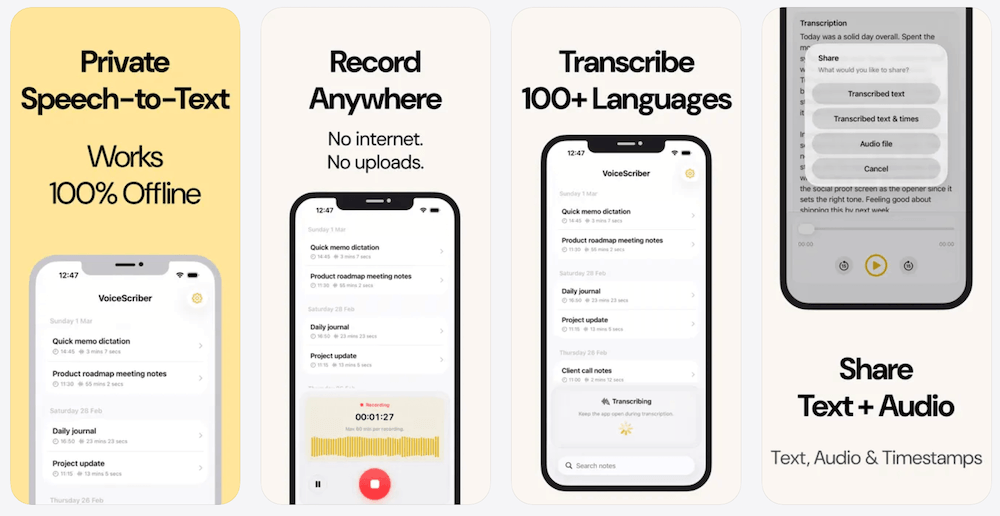
What it is: VoiceScriber's developer says the app records and transcribes entirely on your iPhone, with no server upload or internet required. Its current listing documents up to 90 minutes per recording, screen-lock and app-switch recording, call pause/resume, editable transcripts, tags, search, export, and M4A, MP3, or WAV file imports. For a detailed comparison with other iPhone voice recorder apps that transcribe, including Voice Memos and cloud alternatives, see our comprehensive guide. (Apple)
Best for: iPhone users who want instant transcripts without sending audio to any server.
Platforms: iPhone (requires iOS 17.6+ per App Store compatibility). (Apple)
Offline & privacy evidence: The App Store listing and VoiceScriber privacy policy say transcription is offline, storage is local, and no audio is sent to a server. The App Store lists Data Not Collected. (Apple)
What to watch: For very long sessions, record in segments (each file is capped). Also, always verify you’re exporting manually (share button) rather than enabling any automatic backup workflow.
Pricing: Free to try, with a $5.99 weekly option or a $49.99 lifetime option. Prices vary by storefront. (Apple)
Ready to try VoiceScriber?
Get instant, private transcription on your iPhone. No internet required.
Download on the App StoreScan to downloadon your iPhone
2) Pixel Recorder (Android, Pixel phones) - On‑device, offline transcripts
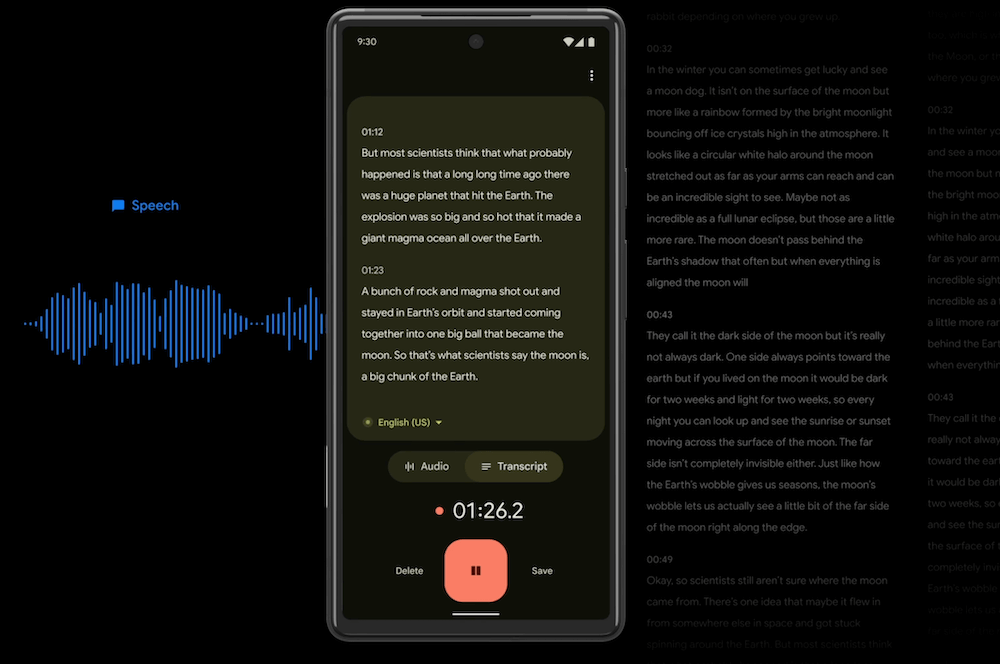
Best for: Pixel users who want searchable transcripts without cloud transcription.
Platforms: Pixel phones (Recorder is Pixel‑exclusive). (Recorder (Google))
Offline proof: Google’s Recorder “About” page explicitly notes the app can run on‑device, and Pixel Help documentation describes using Recorder without a Google Account (backups are optional). (Recorder (Google), Google Help)
What to watch: If you enable backup, recordings may sync to your Google account. Also, certain features can use servers: Google notes that re‑transcribe may process audio on Google servers, and AI summaries (Pixel 8+) run in a secure cloud environment and may require internet for some languages, so avoid summaries if you need strict offline. (Google Help)
3) Apple Voice Memos (iPhone) - Built-in, simple, with optional iCloud sync
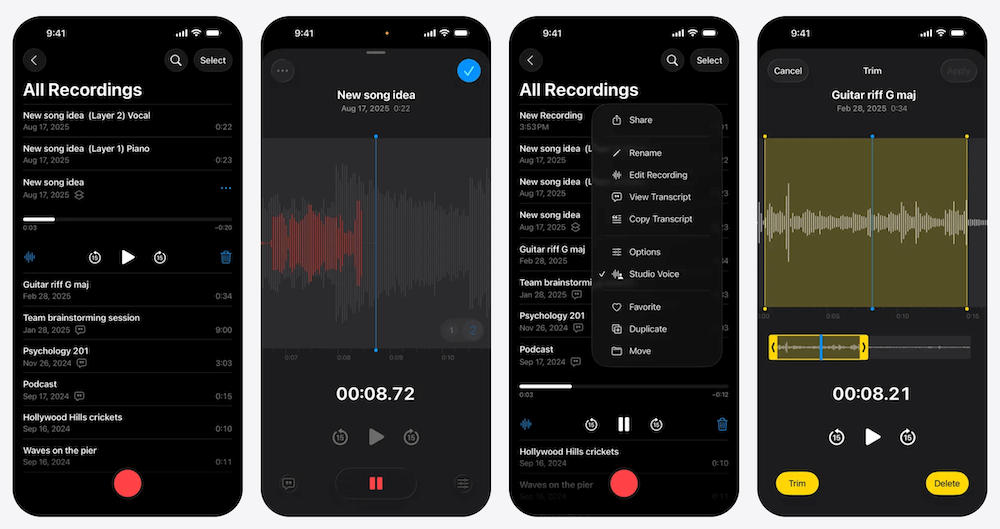
What it is: Apple's built-in recorder saves to a local library and can keep recording while another non-audio app is open. On iPhone 12 or later, Apple also documents transcription for supported languages and regions. Apple does not explicitly describe that transcription as fully offline, so do not assume its processing model is identical to an app that makes an on-device promise. (Apple Support, Apple transcription guide)
Best for: Quick, trustworthy recordings with zero setup.
Platforms: iPhone, iPad, Mac. (Apple Support)
Offline proof: Apple docs show you can record locally; “see your recordings on all your devices” is an optional iCloud workflow you can disable. (Apple Support)
What to watch: If iCloud for Voice Memos is enabled, recordings sync, so turn it off to keep files local‑only. (Apple Support)
4) Shure MOTIV Audio (iOS & Android) - Studio‑grade local WAV
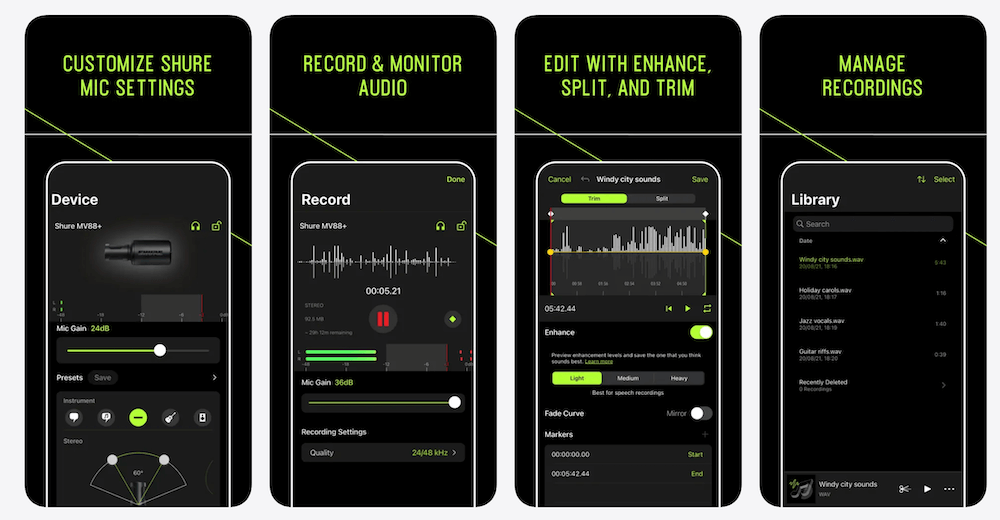
What it is: A clean recorder from Shure with professional controls, metering, and high‑quality capture (including WAV). It’s often used with Shure mics, but you can also record with your phone microphone depending on your setup. (Apple, Google Play)
Best for: Musicians, podcasters, and anyone who wants high‑quality local audio and manual controls.
Platforms: iOS and Android. The App Store shows recent iOS updates (e.g., version history), and Google Play lists Android update timing. (Apple, Google Play)
Offline proof: Recording and saving files does not require a network connection; sharing/export is user‑initiated from the app. (Google Play)
What to watch: Check the store “App Privacy” / “Data safety” sections. Shure’s Play Store listing indicates some data may be collected or shared depending on use; that doesn’t mean your recordings are uploaded automatically, but it’s worth reviewing if you want minimal telemetry. (Google Play)
5) AudioShare (iOS) - Recorder + local file manager for audio
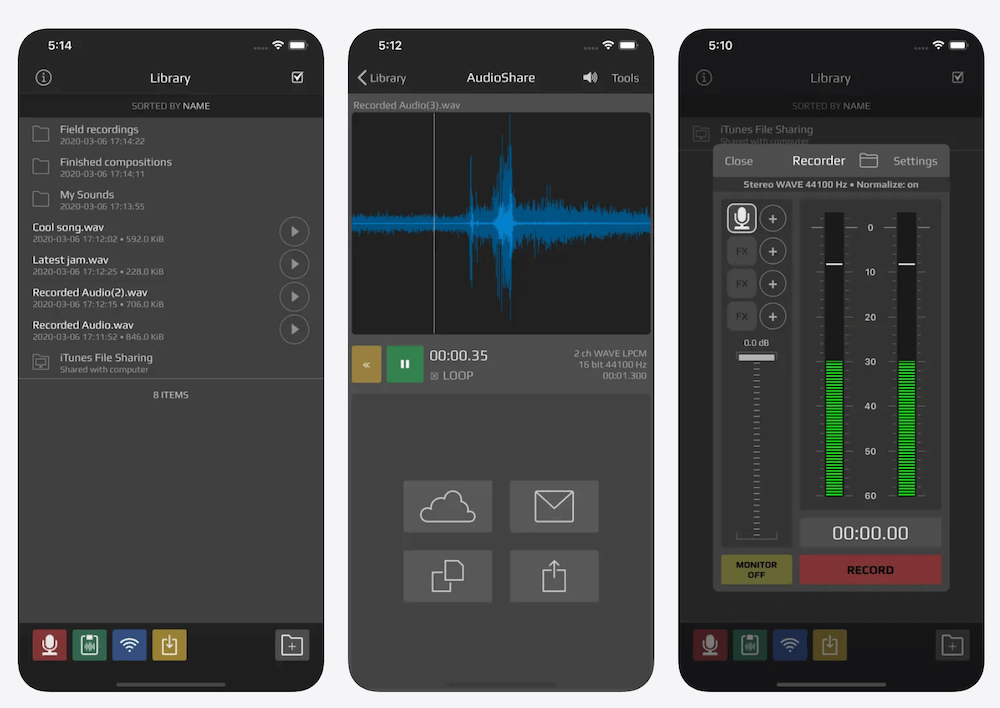
What it is: A long‑standing iOS audio toolbox for recording, trimming, normalizing, and converting files on your device. It’s popular with creators because it behaves like a local audio “file cabinet” and plays nicely with other iOS music/audio apps. (Apple, Kymatica.com)
Best for: Creators who want full control of files and local organization without an account.
Platforms: iOS. (Apple)
Offline proof: AudioShare’s core recording and file management workflows are local. The App Store privacy label indicates Data Not Collected, and the app is sold as a one‑time purchase on the App Store. (Apple)
What to watch: AudioShare includes optional integrations (e.g., Dropbox, Wi‑Fi drive) for moving files. They are useful for workflow, but use them only if you intend to export off‑device.
6) ASR Voice Recorder (Android) - Flexible formats and background recording
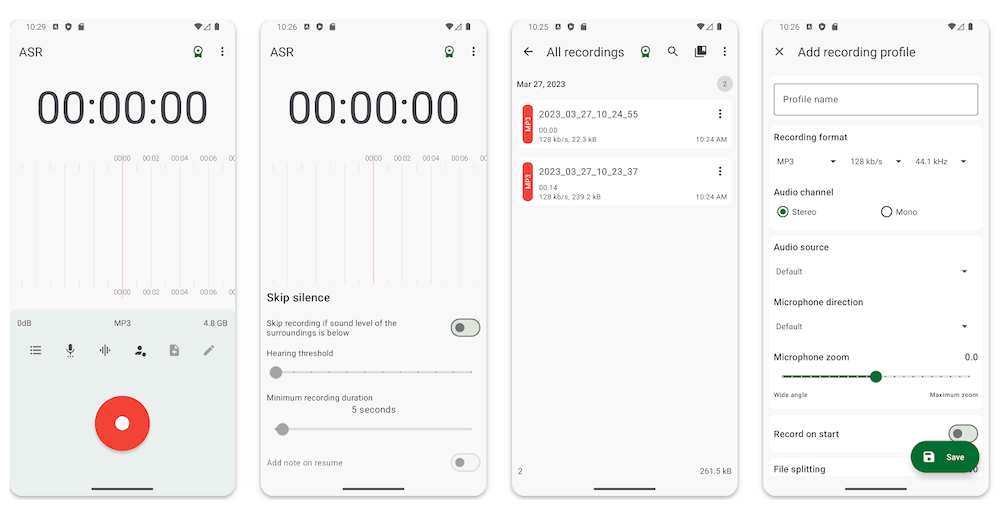
What it is: ASR Voice Recorder is an Android recorder with MP3, WAV, OGG, FLAC, M4A, and AMR formats, recording profiles, tags, notes, and custom folders. Its Google Play listing also documents recording and playback while the app is in the background. (Google Play)
Best for: Android users who need flexible recording formats, tags, and background capture.
Platforms: Android. (Google Play)
Offline use: Keep ASR's optional cloud-upload integrations disabled and run an Airplane Mode test before relying on it for an important recording. (Google Play)
What to watch: The Google Play listing says the app may collect app activity, app information and performance data, and device identifiers. It is a flexible recorder, not the strongest minimal-data choice in this guide. (Google Play)
7) Easy Voice Recorder (Android) - Reliable, no‑account, offline recorder
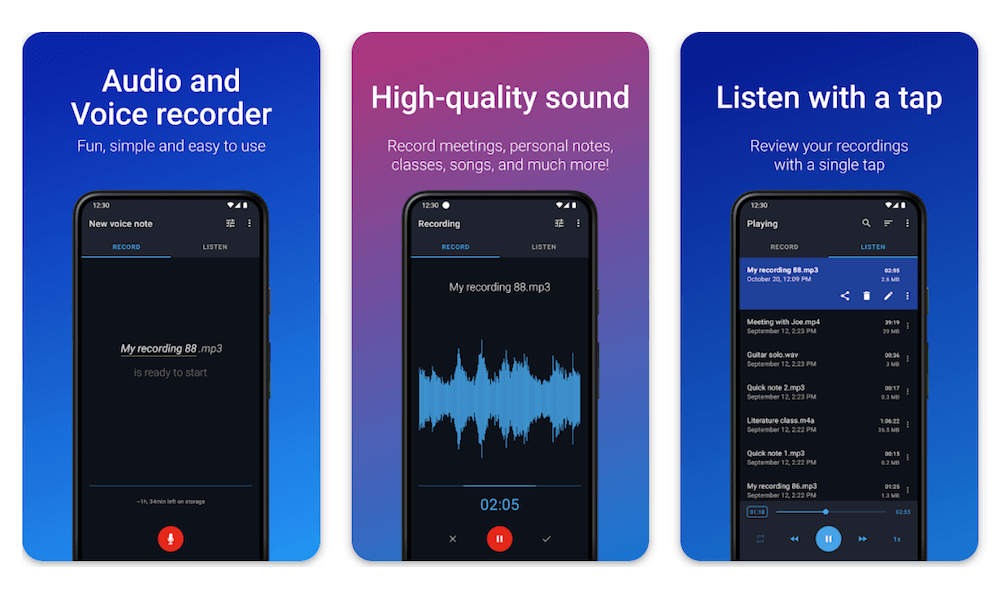
What it is: A widely used Android recorder from Digipom. It records locally and is designed for long, everyday sessions. Pro includes optional features like cloud upload (e.g., Google Drive or Dropbox), so keep that off if you want strict offline. (Google Play (Digipom))
Best for: Straightforward Android recording with simple controls and long sessions.
Platforms: Android. (Google Play)
Offline proof: The app records and saves locally without requiring an account. The Google Play listing highlights that cloud upload is an optional Pro feature (Drive/Dropbox). (Google Play)
What to watch: The free tier may include ads. If ads are a concern (tracking + distraction), consider Pro, but keep cloud upload off if you want local‑only.
Quick decision table
- Need offline transcription on iPhone? VoiceScriber AI. (Apple)
- On Android with a Pixel? Recorder for live, on‑device transcripts (avoid summaries/backups if you want strict offline). (Recorder (Google))
- Just want a dead‑simple local recorder on iPhone? Voice Memos (disable iCloud). (Apple Support)
- Recording music or interviews at high quality? MOTIV Audio or AudioShare. (Google Play, Apple)
- Need flexible Android recording formats and background capture? ASR Voice Recorder (keep optional cloud integrations off). (Google Play)
- Long, everyday sessions on Android? Easy Voice Recorder. (Google Play)
| App | Platform | Records offline | Offline transcription | Optional cloud | Privacy note (fast) |
|---|---|---|---|---|---|
| VoiceScriber | iPhone | Yes | Yes (on‑device) | No upload needed | App Store lists Data Not Collected |
| Pixel Recorder | Pixel phones | Yes | Yes (on‑device) | Backup optional | Summaries/re‑transcribe may use cloud |
| Apple Voice Memos | iPhone/iPad/Mac | Yes | Available on supported iPhones; offline processing not explicitly documented | iCloud optional | Disable iCloud to keep local‑only |
| MOTIV Audio | iOS/Android | Yes | No | Share/export optional | Review store privacy labels for telemetry |
| AudioShare | iOS | Yes | No | Dropbox/Wi‑Fi drive optional | App Store indicates Data Not Collected |
| ASR Voice Recorder | Android | Test in Airplane Mode | No | Cloud upload integrations optional | Flexible formats and background recording; review Google Play data safety |
| Easy Voice Recorder | Android | Yes | No | Drive/Dropbox upload optional | Keep cloud upload off for local‑only |
Why offline matters for privacy
Third‑party exposure is trending up: Verizon’s 2026 DBIR reports third‑party involvement in breaches reached 48%, up 60% year over year, and vulnerability exploitation now starts 31% of breaches. Modern vendor ecosystems increase attack surface. (Verizon DBIR 2026)
Breaches are costly: IBM’s 2025 research estimates the global average breach cost at about $4.4M. (IBM 2025)
Meaning: Every extra integration (backup providers, transcription servers, analytics SDKs) is another place where sensitive audio could be exposed. Choosing an offline recorder won’t stop every risk, but it reduces how many systems ever see your raw recordings, and that’s a real privacy win.
How to keep recordings offline on iPhone
- Turn off iCloud for Voice Memos: Settings → [your name] → iCloud → See All (or “Apps using iCloud”) → Voice Memos → toggle Off. (Apple Support)
- Use Airplane Mode while recording: Optional, but it guarantees no network traffic during the session; you can re‑enable Bluetooth for a mic if needed. (Apple Support)
- Lock down device access: Use a strong passcode/Face ID and keep iOS up to date. Local-only is strongest when the device itself is protected.
How to keep recordings offline on Android
- Disable any in‑app backup toggles: In Pixel Recorder, keep backup off unless you intentionally want Google account sync. (Google Help)
- Avoid “AI summary” or re‑transcribe features if you need strict offline: Some advanced features may run in the cloud depending on the feature and language. (Google Help)
- Turn off cloud auto‑upload in recorder apps: In apps like Easy Voice Recorder Pro, keep Drive/Dropbox upload disabled unless you explicitly want it. (Google Play)
- Quick verification: Record once in Airplane Mode. If the app blocks recording, sign‑in prompts appear, or features break, it’s not offline-first.
Privacy checklist (quick audit)
- Test in Airplane Mode: record → stop → rename → playback.
- Disable sync: iCloud/Google backups, Drive/Dropbox uploads, auto‑share.
- Review store privacy labels: iOS “App Privacy” and Google Play “Data safety” are quick signals (not perfect, but useful).
- Minimize permissions: a recorder usually needs microphone + storage. Be cautious if it requests unrelated permissions.
- Secure the device: encryption + strong lock screen + OS updates.
FAQ
What is the best hidden voice recorder app?
For a consented iPhone recording that needs screen-lock continuity, background operation, offline transcription, local storage, and searchable notes, VoiceScriber is our best documented feature fit. Apple Voice Memos is the best free starting point, while Just Press Record is better for Apple Watch and fast Apple ecosystem capture.
Can a voice recorder app work without an icon?
An app can be removed from the Home Screen or placed behind an operating-system hide feature, but that does not make active recording invisible. iPhone still shows its orange microphone indicator. Android 12 and later shows a green indicator, and locking Android Private Space stops the apps inside it, so it cannot conceal a recorder that keeps running.
Is a hidden or secret voice recorder legal?
It depends on where you are, who is being recorded, and whether the conversation carries a reasonable expectation of privacy. Consent laws vary by jurisdiction and can carry criminal or civil penalties. The safest approach is to tell everyone, obtain clear permission, and check the rules that apply to every participant before recording.
What does “hidden audio recorder app” mean?
It usually means one of four things: recording with the screen locked, continuing while another app is open, protecting access to saved files, or keeping audio off cloud transcription servers. Compare those capabilities separately because an app's name does not prove any of them.
Can an iPhone record with the screen locked?
Yes. iOS supports background audio recording when an app is configured correctly. Actual results still depend on the app, microphone permission, available storage, interruptions, and the current iOS and app versions, so test before an important session.
Can Android record audio with the screen off?
Yes, when the recorder starts correctly and supports a microphone foreground service. Google says Pixel Recorder continues when the screen sleeps, and its ongoing notification remains visible. Other Android recorder apps can behave differently because of battery settings, permissions, and device software, so run a screen-off test before an important session.
What is the best private voice recorder app?
The best private voice recorder app is one that records locally, works without an account, and does not upload audio for core recording. For iPhone users who also need offline transcription, VoiceScriber is the best fit here. For Android users, Pixel Recorder is strongest on Pixel phones, while ASR Voice Recorder is the flexible-format option.
Are all these voice recorder apps usable with no internet?
Yes for core recording. Every pick can record offline. If an app offers backups or smart features, keep them off (iCloud sync, Pixel backups, Drive/Dropbox uploads) to stay local-only.
Which apps transcribe speech offline?
VoiceScriber (iOS) and Pixel Recorder (Pixel phones) can transcribe on-device. Some add-on features (like Pixel summaries) may require cloud processing, avoid them for strict offline workflows.
Do any of these apps require an account?
No account is required to record in these apps. Optional features such as backup or cloud upload may require sign-in; leave those disabled to keep recordings local-only.
What is a secure voice recorder app?
A secure voice recorder app should work offline, store audio locally, request only necessary permissions, and make sharing or backup user-initiated. Store privacy labels help, but the practical test is simple: record, rename, and play back in Airplane Mode, then check that backup and sync toggles are off.
What Android recorder supports flexible formats and background recording?
ASR Voice Recorder supports multiple audio formats, tags, custom folders, and background recording according to its Google Play listing. Keep its optional cloud-upload integrations off and run an Airplane Mode test if local-only recording is important.
What's the longest single file I can record?
It varies by app and device. Easy Voice Recorder is designed for long sessions; VoiceScriber caps at 90 minutes per file; others typically depend on available storage and battery.
How do I keep iPhone recordings from syncing to iCloud?
Settings > [your name] > iCloud > See All (or Apps using iCloud) > Voice Memos > Off.
Do Pixel Recorder summaries work offline?
Transcription can run on-device, but Google notes summaries can run in a secure cloud environment and may require internet for some languages. Avoid summaries and keep backups off for strict offline.
How can I double-check an app isn’t uploading audio?
Record in Airplane Mode, then review in-app settings for backups/sync. Check iOS App Privacy / Google Play Data safety labels, and keep any cloud upload toggles disabled for local-only use.
Is it safe to use these apps for sensitive professional recordings?
For legal, clinical, or journalistic work, keep recordings local by default. VoiceScriber and Pixel Recorder also transcribe on-device. Device security matters too -- use a strong passcode and keep your OS updated. Consult your organization’s compliance requirements.
What audio format should I use for local-only recordings?
The default format (M4A on iPhone, OGG or AAC on Android) works for most workflows. WAV gives uncompressed audio for archiving or editing at the cost of larger file sizes. MOTIV Audio and AudioShare support WAV; VoiceScriber uses the default iOS audio format.
Can I transfer recordings between these apps?
Yes. On iPhone, export the recording to Files, then import into another app that accepts audio, such as VoiceScriber, which has an import button next to the mic for M4A, MP3, and WAV files. On Android, most recorder apps save to a standard folder accessible via Files.
Where to start
The fastest privacy win is simple: pick an app that runs locally, disable any backup feature, and test in Airplane Mode before you rely on it. For iPhone, VoiceScriber covers both recording and on-device transcription. For Pixel phones, Recorder does the same. For everything else, Voice Memos and the Android picks on this list get the job done without touching a server. Your recordings stay where they belong.
Sources
- Apple. Status icons and microphone privacy indicator on iPhone.
- Apple. Lock or hide an app on iPhone.
- Apple. Audio sessions for recording and background audio.
- Apple. View a Voice Memos transcription on iPhone.
- Apple App Store. VoiceScriber listing, version history, privacy details, and pricing.
- Apple App Store. Just Press Record listing.
- Apple App Store. Murmur: Voice Notes listing.
- Apple App Store. BlackBox Life Voice Recorder listing.
- Apple App Store. Voice Record Pro listing and App Privacy label.
- Verizon. 2026 Data Breach Investigations Report announcement.
- IBM. Cost of a Data Breach Report 2025.
- Google. Android 16 Advanced Protection.
- Google. Android security and privacy updates in 2026.
- Google. Android microphone and camera privacy indicators.
- Google. Pixel Recorder screen-off recording and on-device transcription.
- Google. Android Private Space behavior.
- Android Developers. Microphone foreground service requirements.
- Apple. Control access to information in apps on iPhone.
- Google Play. ASR Voice Recorder.
- Reporters Committee for Freedom of the Press. Reporter's Recording Guide.
Related articles
- Offline vs. cloud transcription: what to consider → VoiceScriber vs. cloud transcription
- Mental health & journaling → Voice journaling for mental clarity: keep your private thoughts off the cloud
- Field workflows → Offline transcription for journalists
- Legal compliance → Secure offline transcription for lawyers
- Step-by-step guide → How to transcribe meetings & lectures on iPhone offline
- Market overview → Best offline transcription apps (2026)
- Note‑taking tools → Top AI note‑takers (2025)
- Desktop alternative → OfflineTranscribe alternative: offline transcription for iPhone and Mac
Own your words, everywhere
Start building your local-first stack with VoiceScriber: offline transcription, 100+ developer-claimed languages, and local storage.
Download on App StoreScan to downloadon your iPhone