
Wispr Flow is better for polished voice dictation across apps. Otter.ai is better for meeting notes, speaker labels, and team workflows. Neither is an offline transcription app: both rely on cloud processing for transcription. VoiceScriber is the offline iPhone alternative, with transcription running on-device and no audio uploaded.
This updated comparison breaks down where each tool excels and where it falls short, covering privacy models, offline capability, pricing, accuracy, recent 2026 product updates, and what we found after checking the latest 500 iOS App Store reviews for each app.
Quick summary:
- Wispr Flow is the better pick for polished voice dictation across apps on Mac, Windows, iPhone, and Android.
- Otter.ai is the better pick for shared meeting notes, speaker labels, imports, and team collaboration.
- Neither Wispr Flow nor Otter.ai offers true offline transcription: both rely on internet-connected cloud processing.
- In the latest 500 iOS reviews we checked, Wispr Flow averaged 4.14 with 342 five-star reviews; Otter averaged 2.57 with 339 one-to-three-star reviews.
- Wispr Flow Pro costs $15/month monthly; Otter Pro costs $16.99/month monthly; VoiceScriber offers $49.99 lifetime or $5.99/week.
- If offline processing and local-only privacy are non-negotiable, VoiceScriber is the closer fit: all transcription runs on the iPhone with nothing uploaded.
TL;DR
Wispr Flow is the better dictation product. Otter.ai is the better meeting-notes product. Neither is the right tool if you need true offline transcription. Wispr says transcription always occurs on the cloud, and Otter says an active internet connection is required for real-time transcription. If you need Airplane Mode transcription on iPhone, VoiceScriber is the offline alternative to both.
What this comparison answers
This article answers five practical questions:
- Does Wispr Flow work offline?
- Does Otter.ai work offline?
- Is Wispr Flow cloud-based?
- Which one is better for privacy?
- Is there a local, offline alternative if both are cloud-first?
Comparison table: Wispr Flow vs Otter.ai vs VoiceScriber
| Feature | Wispr Flow | Otter.ai | VoiceScriber |
|---|---|---|---|
| Best for | Dictating polished text into any app | Live meeting transcription and shared notes | Private, offline iPhone voice notes |
| Offline mode | No. Transcription always occurs on the cloud | No. Active internet required for real-time transcription | Yes. All processing happens on-device |
| Privacy model | Cloud processing. Privacy Mode = zero retention, not local processing | Cloud storage and processing. Data stored in AWS S3, deleted items kept 30 days | Local-only. Nothing uploaded, no account needed |
| Pricing | Free tier; $15/mo monthly Pro or $12/mo annual (pricing page) | Free Basic; $16.99/mo monthly Pro or $8.33/mo annual (pricing page) | $49.99 lifetime or $5.99/week (details) |
| Platforms | Mac, Windows, iPhone, Android | Desktop app, iOS, Android, Chrome extension | iPhone |
| Language support | 100+ languages | Multiple (varies by plan) | 100+ languages offline |
| Free tier limits | 2,000 words/week on Mac | 300 min/month | Free to try |
| Recent iOS review signal | 4.14 average across the latest 500 reviews we checked; strong praise for speed, with repeated iPhone workflow and pricing complaints | 2.57 average across the latest 500 reviews we checked; praise for meeting capture, with heavier pricing, support, privacy, and reliability complaints | Offline iPhone alternative for users who want local transcription rather than a cloud workflow |
| 2026 product direction | Expanding mobile dictation across iPhone and Android, while iPhone microphone-permission friction remains a visible theme | Moving further into enterprise meeting intelligence with AI agents and shared conversation knowledge | Focused on private iPhone voice notes, instant offline search, and on-device transcription |
| Data retention | Zero with Privacy Mode | Until deleted + 30 days in Trash | On-device only |
| AI training use | Possible if Privacy Mode off | De-identified data only | None |
What the latest 500 iOS reviews show
We checked the latest 500 iOS App Store reviews for each app. Wispr Flow's recent review set is much more positive overall, but its complaints cluster around iPhone workflow friction, pricing, accuracy, and mic or battery behavior. Otter's recent review set is more negative, with pricing and subscription limits the dominant complaint, followed by accuracy, privacy, reliability, and support concerns.
| Review signal | Wispr Flow | Otter.ai |
|---|---|---|
| Date range checked | Dec. 29, 2025 to May 13, 2026 | Nov. 30, 2023 to May 12, 2026 |
| Average rating | 4.14 | 2.57 |
| Five-star reviews | 342 of 500 | 125 of 500 |
| One-to-three-star reviews | 125 of 500 | 339 of 500 |
| Main complaint themes | iPhone workflow friction, pricing, accuracy or formatting, bugs, mic and battery behavior | Pricing or subscription limits, accuracy, privacy, support, reliability, mobile app workflow |
"saving me hours per day in typing"
Wispr Flow praise from Oz_gadgetman, who called it "A must have."
Wispr Flow iOS review, May 2026"switching between apps"
Wispr Flow criticism from gen099, who liked the app but called out mobile friction and the $15/month price.
Wispr Flow iOS review, May 2026"captured every speaker"
Otter praise from Growth Con, showing why Otter still makes sense for meetings and multi-speaker events.
Otter iOS review, May 2026"$16.99 a month is also insane"
Otter criticism from Jozette_Mina, matching the broader pricing and free-limit complaint pattern.
Otter iOS review, May 2026The review evidence supports the product split. Wispr Flow has a stronger happiness signal when users want faster writing and can accept cloud dictation. Otter has real value for meetings, but the recent iOS review pattern shows heavier friction around subscriptions, limits, and reliability. If your priority is offline, private iPhone transcription, neither pattern solves the core problem - that is where VoiceScriber fits.
Recent product updates worth knowing
Two 2026 updates matter for this comparison.
- Wispr Flow: the App Store listing now shows version 1.59.1 and iOS 18.3 or later. In a public April 15, 2026 reply on X, the Wispr team acknowledged that Apple's microphone permission changes were adding "unnecessary friction" and directed affected users to support.
- Otter.ai: on April 28, 2026, Otter announced a broader enterprise direction around a Conversational Knowledge Engine, including Meeting Agent, Sales Agent, and SDR Agent products. That pushes Otter further toward business knowledge workflows, not offline personal dictation.
That direction reinforces the buying decision: Wispr is a voice keyboard, Otter is becoming a meeting intelligence platform, and VoiceScriber is the local iPhone transcription option when you do not want cloud processing.
Need transcription that works without internet?
VoiceScriber works 100% offline. No cloud, no account, no subscription required. Try it free.
Download VoiceScriber Scan to download
on your iPhone
What Wispr Flow is
Wispr Flow is a voice dictation product. Its site describes it as a voice keyboard that works inside apps like Slack, Messages, Email, WhatsApp, ChatGPT, and Docs. Wispr says it is available on Mac, Windows, iPhone, and Android, and claims Flow is "4x faster than typing." The main appeal goes beyond raw transcription: it removes filler words, formats lists, catches punctuation, and applies edits while you speak.
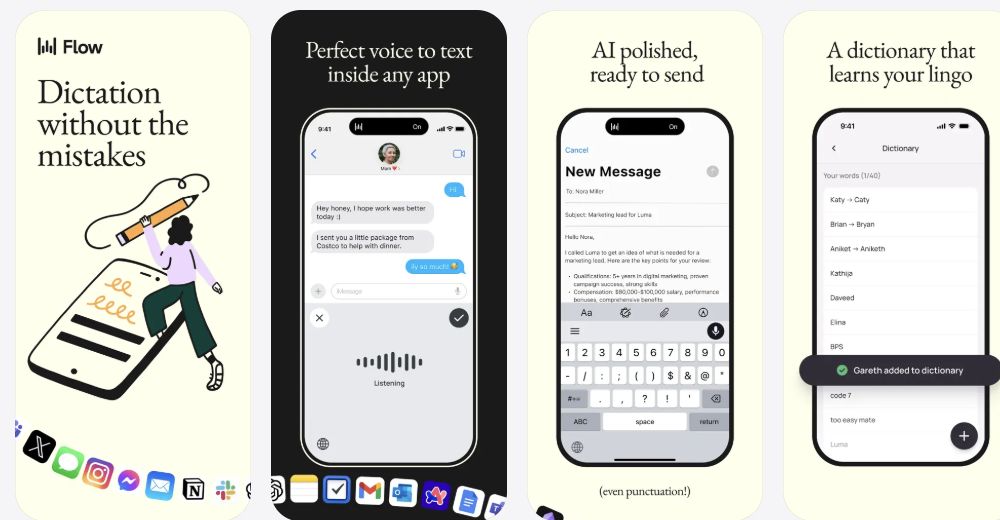
That means Wispr is strongest when your goal is writing faster. If you spend your day replying to messages, drafting notes, or dictating into text boxes, Wispr is the more natural fit than Otter. It is less of a "meeting archive" product and more of a "voice typing everywhere" product.
What Otter.ai is
Otter.ai is a meeting transcription and collaboration product. Otter describes itself as a smart note-taking app that combines audio, transcription, speaker identification, inline photos, and key phrases. Its pricing page centers live transcription, speaker identification, meeting workflows, imports, and team features.
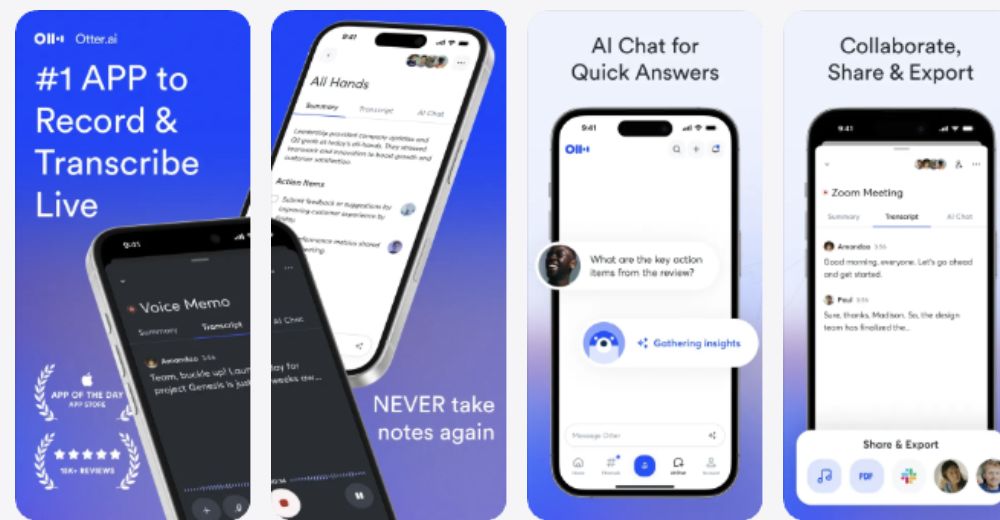
That means Otter is strongest when your goal is capturing meetings, lectures, interviews, and team conversations. It has more meeting-specific structure than Wispr, especially if you care about speaker labels, shared notes, imports, and organization after the meeting ends.
What VoiceScriber is
VoiceScriber is an iPhone app built around offline recording and on-device transcription. It records and transcribes completely offline, supports 100+ languages, lets you edit, search, and share transcripts, and does not upload audio to a server. No account, no internet, and no data collection required to start.
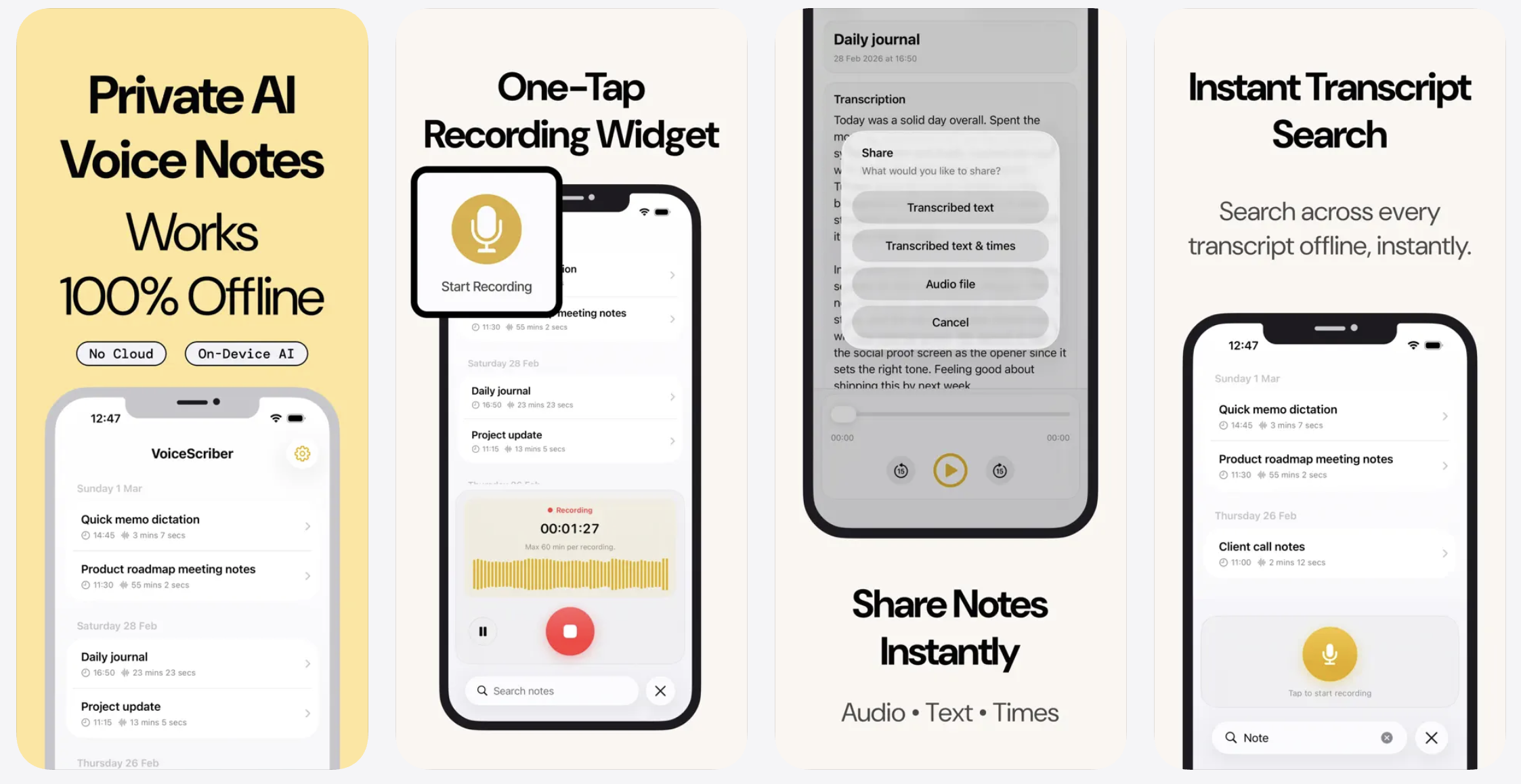
VoiceScriber is different from both Wispr and Otter. It is not a cloud meeting hub or a cross-app voice keyboard. It is for people who want their audio and text to stay on the phone, including in Airplane Mode. For a deeper look at how on-device processing compares to cloud services, see VoiceScriber vs. cloud transcription.
Try the offline option before choosing another cloud plan
Record, transcribe, search, and share on iPhone with no account and no upload. Works in Airplane Mode. Free to try, then $49.99 lifetime or $5.99/week.
Try VoiceScriber OfflineScan to downloadon your iPhone
What the official docs say about offline mode
Wispr Flow does not offer true offline transcription
Wispr's own documentation is direct. Its help center says "Flow requires an internet connection for transcription." Its data controls page says "Transcription always occurs on the cloud." If you are offline on desktop, Flow shows a "No internet connection" message and will not begin recording. For the complete platform-by-platform answer to does Wispr Flow work offline, see our dedicated guide.
The answer to "does Wispr Flow work offline?" is no for transcription. Even with Privacy Mode enabled, the transcription still happens remotely. Privacy Mode changes retention, not where the transcription happens. The OWASP Mobile Top 10 highlights insecure communication and data leakage as persistent mobile risks — risks that on-device processing sidesteps entirely.
Otter.ai does not offer true offline live transcription
Otter's help center says an active internet connection is required for real-time transcription. If your device loses network, Otter can continue to record, but it will not provide a live transcription until the connection returns and the audio uploads.
The answer to "does Otter.ai work offline?" is also no for live transcription. It can keep recording through a connection drop, but it is not an Airplane Mode transcription tool.
VoiceScriber is the offline option in this comparison
VoiceScriber transcribes directly on the iPhone, keeps recordings on-device, and requires no internet. Nothing is uploaded to a server.
On-device transcription is now practical at scale. Gartner expects on-device generative AI smartphone spending to reach $393.3 billion in 2026, driven by wider local model adoption.
If your deciding question is "Will this still transcribe in Airplane Mode?" - VoiceScriber is the match among these three. For a broader look at which apps pass the Airplane Mode test, see which transcription apps actually work offline.
What Wispr Flow Privacy Mode actually means
Wispr Flow's Privacy Mode is easy to misunderstand. Wispr says Privacy Mode enables zero data retention for dictation content. When enabled, voice audio is processed for transcription and immediately discarded, with no dictation data, prompts, or derived content stored on Wispr servers.
But Wispr also says transcription always occurs on the cloud. Voice audio and transcription results are transmitted between the device and Wispr's servers over TLS.
The cleanest way to describe Privacy Mode: it is zero-retention cloud processing, not local-only processing. That is still valuable - it means Wispr doesn't keep your data. It is just different from VoiceScriber's "nothing leaves the phone" model.
This distinction matters in practice. IBM's 2025 Cost of a Data Breach Report puts the average global data-breach cost at $4.44 million. Privacy Rights Clearinghouse counted 4,080 unique breach events affecting at least 375 million individuals in 2025, with 8 of the 20 largest breaches at service providers. Data minimization — keeping audio off the network entirely — reduces the blast radius of any potential incident.
How Otter.ai handles privacy and data retention
Otter's privacy and security page says conversations are private to you and the people you share with. Deleted conversations move to Trash, where Otter automatically deletes them after 30 days. Otter uses AWS S3 storage with AES-256 server-side encryption.
Otter's privacy policy goes further: it stores personal information for as long as necessary for the purposes in the policy or as required by law. Otter shares personal information with cloud service providers for compute and storage, data labeling providers, and AI service providers for backend support.
Otter is not careless. Customer consent is required before employees access transcripts or recordings. AI service providers do not use customer data sent through the API to train their models. But your audio does live on Otter's servers for as long as your account exists.
Verizon's 2025 Data Breach Investigations Report found that third-party involvement in breaches doubled from 15% to 30% in one year. Every cloud upload adds another vendor to the trust chain.
How training and model improvement differ
With Wispr, the data controls page says: if Privacy Mode is enabled, none of your dictation data is stored or used for model training by Wispr or third parties. If Privacy Mode is disabled, dictation data may be used to evaluate, train, and improve Flow's features and AI models.
With Otter, the privacy page says it uses a proprietary method to de-identify user data before training models. Audio recordings and transcripts are not manually reviewed by a human for that training process. Imported customer data is not used to create, train, or improve machine-learning models.
Both products involve cloud processing. The difference is in retention, sharing, and training controls. With VoiceScriber, there is no cloud component - audio and transcripts stay on the device, and there is no model training or data sharing to configure.
Pricing comparison: which one is cheaper?
Wispr Flow pricing
Wispr's pricing page shows a Free tier with 2,000 words/week on Mac or Windows, 1,000 words/week on iPhone, and unlimited words/week on Android (limited time). Flow Pro costs $15/user/month monthly or $12/user/month billed annually.
Otter.ai pricing
Otter's pricing page shows a Free Basic plan with 300 monthly transcription minutes and 3 lifetime file imports. Pro costs $16.99/user/month monthly or $8.33/user/month billed annually. Business is $19.99/user/month on annual pricing.
VoiceScriber pricing
VoiceScriber has two plans: $5.99/week or $49.99 lifetime. You can try it free with no account or credit card required.
The practical pricing math
Wispr Pro at $12/month annually costs $144/year. Otter Pro at $8.33/month annually costs $100/year. VoiceScriber's lifetime purchase is $49.99 once - that pays for itself against Otter in 6 months and against Wispr in 4 months.
If you want cloud subscription dictation, Wispr is slightly cheaper than Otter at the entry monthly level. If you want shared meeting notes and team workflows, Otter's pricing makes more sense. If you want to avoid another monthly bill and your use case fits iPhone-only offline transcription, VoiceScriber's lifetime option is the simplest long-term pricing model of the three. See the full best offline transcription apps comparison for more options.
Why a single "accuracy" score is misleading
A 2025 ACL paper evaluating automatic speech recognition across diverse audio conditions notes that accuracy varies with accent, gender, overlapping speech, and background noise. A separate 2025 TSD conference paper found that in audio with 16% speaker overlap, the baseline word error rate on overlapping segments was 68.0%.
A single benchmark number does not reflect how these tools will perform in your environment. The better question is: which app is built for your situation? Wispr is built for polished dictation into text fields. Otter is built for meeting capture with speaker labels. VoiceScriber is built for local, offline iPhone transcription.
Which one should you pick?
Choose Wispr Flow if you need voice typing everywhere
Wispr is the pick if your problem is typing friction. Replying to messages faster, dictating into ChatGPT, writing in Docs, or speaking inside text boxes all day - Wispr's app-wide dictation, formatting, filler cleanup, and dictionary features are the core reason to buy it. If pricing is your main question, see the dedicated Wispr Flow pricing and review. If you later need an offline fallback, see the free Wispr Flow alternatives that dictate without a connection.
Choose Otter.ai if you need meeting transcripts
Otter is the pick if your problem is meetings. Real-time transcription, shared notes, speaker identification, imports, and cross-device conversation history - Otter is a meeting-notes platform first, not a voice keyboard. If you later need an offline option, see Otter.ai alternative: private offline transcription.
Choose VoiceScriber if offline privacy is the deciding factor
If your key question is "Can I still record and transcribe with no signal, and can my audio stay on the device?" - neither Wispr nor Otter answers yes. VoiceScriber is the fit: on-device transcription, no uploads, no account, and a $49.99 lifetime purchase instead of another monthly subscription.
Related articles
- Does Wispr Flow work offline? The airplane-mode verdict
- Which transcription apps actually work offline?
- VoiceScriber vs. cloud transcription
- Best offline transcription apps in 2026
- Top 5 iPhone voice recorder apps that transcribe
- Wispr Flow alternative: offline voice dictation
- Otter.ai alternative: private offline transcription
FAQs
Does Wispr Flow work offline?
No for transcription. Wispr's data controls page says transcription always occurs on the cloud, and its help docs say internet is required for transcription. You cannot dictate in Airplane Mode.
Does Otter.ai work offline?
Not for real-time transcription. Otter's help center says live transcription needs an active internet connection. It can keep recording during a network drop and upload later, but it will not transcribe until connected.
Is Wispr Flow cloud-based?
Yes. Wispr's data controls page states directly that transcription always occurs on the cloud. Even with Privacy Mode enabled, audio is transmitted to Wispr's servers for processing.
What does Wispr Flow Privacy Mode actually do?
It enables zero data retention for dictation content. Wispr says audio is processed, delivered, and immediately discarded from its servers. But the transcription still happens in the cloud - Privacy Mode changes how long data is stored, not where it is processed.
Does Otter.ai keep transcripts on its servers?
Yes. Otter's privacy page says conversations stay in its system until deleted, then move to Trash where they are automatically deleted after 30 days. Otter uses AWS S3 storage with AES-256 encryption.
How much does Wispr Flow cost vs Otter.ai?
Wispr Flow Pro costs $15/month (or $12/month billed annually). Otter Pro costs $16.99/month (or $8.33/month billed annually). VoiceScriber is $49.99 lifetime or $5.99/week.
Is there a transcription app that works in Airplane Mode?
Yes. VoiceScriber runs all transcription on-device on iPhone. It works in Airplane Mode, requires no internet connection, and keeps audio and transcripts on the phone. Neither Wispr Flow nor Otter.ai can transcribe in Airplane Mode.
Which app has better recent iOS reviews?
Wispr Flow has the stronger recent iOS review signal in the latest 500 reviews we checked: 4.14 average with 342 five-star reviews. Otter averaged 2.57, with 339 one-to-three-star reviews. The result does not mean Otter is a bad meeting product, but it does show heavier recent iOS frustration around limits, subscriptions, support, privacy, and reliability.
What changed for Wispr Flow and Otter.ai in 2026?
Wispr Flow continued expanding mobile dictation and publicly acknowledged iPhone microphone-permission friction in April 2026. Otter announced a broader enterprise Conversational Knowledge Engine direction in April 2026, with Meeting Agent, Sales Agent, and SDR Agent products.
Can Wispr Flow and Otter.ai use my data for AI training?
With Wispr, if Privacy Mode is disabled, dictation data may be used to train and improve Flow's models. With Otter, user data is de-identified before model training, and imported customer data is not used for training. VoiceScriber has no cloud component and no data sharing.
Which app is the most accurate?
There is no single accuracy winner. Research shows speech recognition accuracy varies with accent, background noise, overlapping speech, and recording quality. Wispr is optimized for polished dictation, Otter for meeting capture, and VoiceScriber for local offline transcription on iPhone.
Does VoiceScriber work on Mac, Windows, or Android?
No. VoiceScriber is iPhone-only. If you need cross-platform coverage, Wispr Flow supports Mac, Windows, iPhone, and Android. If you need meeting transcription on desktop, Otter has a desktop app and Chrome extension. VoiceScriber is the pick specifically for offline iPhone transcription.
Is Wispr Flow's "zero data retention" the same as offline?
No. Zero data retention means Wispr discards your audio after processing - it does not store it. But the audio still travels to and from Wispr's cloud servers for transcription. Offline means audio never leaves the device. They address different parts of the privacy question.
The bottom line
Wispr Flow wins on voice dictation across apps. Otter.ai wins on meeting transcription and team features. Both require internet and both process audio in the cloud. If you need transcription that works without a connection - and you want audio to stay on your device - download VoiceScriber and test it in Airplane Mode. Takes under two minutes. On budget alone, check whether Wispr Flow is free and what Pro actually costs, and how long ChatGPT can record audio if you were considering that route instead.
Related articles
- Can ChatGPT Transcribe Audio? Limits, Privacy & Offline Alternative
- Which Transcription Apps Actually Work Offline? (7 Apps Tested)
- Best Offline Transcription Apps in 2026
- 5 Best Otter.ai Alternatives (Free, Offline & Private)
- Wispr Flow Pricing & Review 2026
- Wisprflow alternatives compared: offline dictation without a subscription
Sources
- IBM. Cost of a Data Breach Report 2025.
- Verizon. 2025 Data Breach Investigations Report.
- Gartner. Worldwide Generative AI Smartphone Spending Forecast (2025).
- Privacy Rights Clearinghouse. 2025 Data Breach Report.
- OWASP. Mobile Top 10 (2023 Risks).
- Wispr Flow. Data Controls.
- Wispr Flow. iOS App Store listing.
- Wispr Flow. April 15, 2026 X reply about iPhone microphone permission friction.
- Otter.ai. Privacy & Security.
- Otter.ai. April 28, 2026 Conversational Knowledge Engine announcement.
- Otter.ai. iOS App Store listing.
- VoiceScriber review analysis. Latest 500 Wispr Flow iOS reviews and latest 500 Otter.ai iOS reviews checked from locally supplied review files on May 15, 2026.
- ACL 2025. Evaluating ASR Across Diverse Audio Conditions.
- TSD 2025. Speaker Overlap and Word Error Rate.