
OfflineTranscribe does one thing well: it transcribes audio files locally on Windows without sending data to the cloud. But it only runs on Windows 10 and 11. If you record on an iPhone or work on a Mac, you need an alternative that offers the same zero-upload privacy on your actual device. Here are three that do.
Key takeaways
- OfflineTranscribe is Windows-only. It transcribes audio files locally but has no iPhone or Mac app. It costs €49.99/year.
- VoiceScriber is the iPhone alternative. Records and transcribes in real time, 100% on-device, 100+ languages, $49.99 lifetime.
- MacWhisper covers Mac users. Uses Whisper AI models locally, supports file import and real-time recording, $29.99/year or $79.99 lifetime.
- whisper.cpp is free but technical. Open-source, runs on any platform, but requires compiling from source and command-line fluency.
Need offline transcription on iPhone?
VoiceScriber records and transcribes on-device. No cloud, no uploads, works in airplane mode. 100+ languages.
Download VoiceScriberWhat is OfflineTranscribe?
OfflineTranscribe is a German-made desktop application that converts audio files to text entirely on your computer. No audio leaves your machine. It uses local AI models (based on OpenAI's Whisper architecture) that run on your CPU, with model files stored on your hard drive.
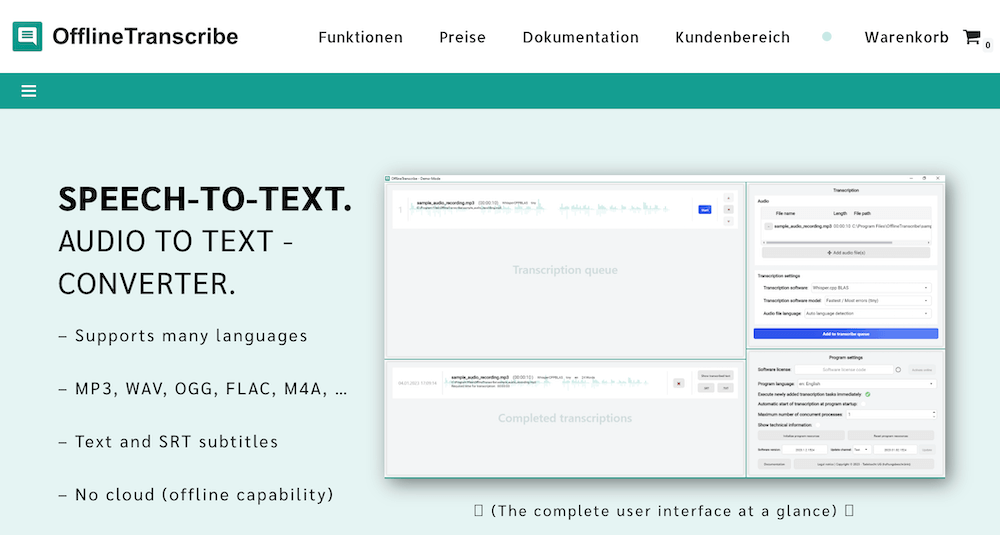
Here's what it offers:
- Platform: Windows 10 and Windows 11 only
- Languages: 99+ supported
- Audio formats: MP3, WAV, OGG, FLAC, M4A
- Output: Plain text (TXT) and SRT subtitle files with timestamps
- Batch processing: Included CLI tool for automated transcription via scripts
- Storage: ~500 MB for the app, up to 20 GB for transcription models
- Pricing: €49.99/year (single user) or €127/3 years (€3.53/month equivalent)
- Internet: One-time connection for license activation and model downloads, then fully offline
The tool works well for what it does. If you sit at a Windows PC and need to transcribe pre-recorded audio files with full privacy, OfflineTranscribe handles it. The batch CLI is a genuine advantage for users who need to process dozens of files automatically.
The gap: no iPhone, no Mac
OfflineTranscribe's biggest limitation isn't accuracy or features - it's platform lock-in. The software runs only on Windows 10 and 11. No Mac app. No iPhone app. No mobile version of any kind.
That creates a real problem for three groups:
- iPhone users who record on the go. If you capture voice notes, interviews, or meeting audio on your phone, you'd need to transfer files to a Windows PC before transcribing. That adds friction - and every file transfer is a potential exposure point for sensitive recordings.
- Mac users. No macOS support means no native option. Running Windows in a VM or Boot Camp just for transcription isn't practical for most people.
- Anyone who needs real-time transcription. OfflineTranscribe only works with pre-recorded audio files. You can't speak into it and get live text. You record separately, save the file, then import it.
The privacy principle behind OfflineTranscribe is sound: keep audio off the cloud, process locally, own your data. The question is how to get that same principle on the devices you actually use. For a broader look at why offline AI transcription matters, we've written a separate breakdown.
Side-by-side comparison: OfflineTranscribe vs. alternatives
| Feature | OfflineTranscribe | VoiceScriber | MacWhisper | whisper.cpp |
|---|---|---|---|---|
| Platform | Windows 10/11 | iPhone (iOS 17+) | Mac (macOS 13+) | Windows, Mac, Linux |
| Real-time recording | No (file import only) | Yes | Yes | No (file-based) |
| Internet for transcription | No | No | No | No |
| Languages | 99+ | 100+ | 100+ | 99+ |
| Pricing | €49.99/year | $49.99 lifetime or $5.99/week | $29.99/year or $79.99 lifetime | Free (open-source) |
| Output formats | TXT, SRT | Text (copy/share/export) | TXT, SRT, VTT, CSV | TXT, SRT, VTT |
| Batch processing | Yes (CLI) | No | Yes | Yes (CLI) |
| Technical setup | Low (installer) | None (App Store) | Low (App Store) | High (compile from source) |
| SRT subtitle output | Yes | No | Yes | Yes |
| Data privacy | Local only | Local only, zero data collection | Local only | Local only |
For a wider comparison of offline transcription tools including cloud-based competitors, see our full roundup of the best offline transcription apps in 2026.
VoiceScriber - the iPhone alternative to OfflineTranscribe
VoiceScriber - real-time offline transcription on iPhone
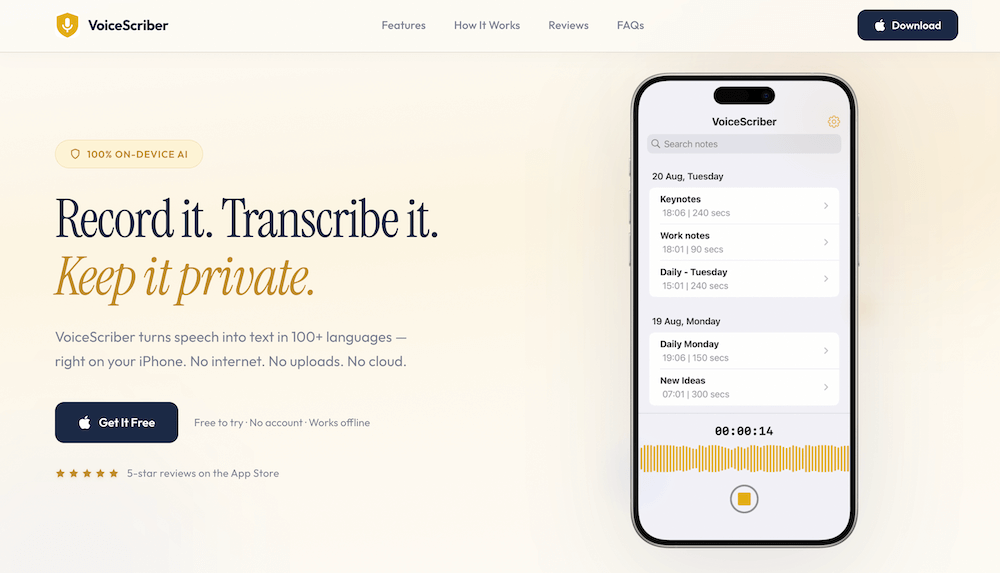
VoiceScriber records and transcribes speech in real time directly on your iPhone without requiring an internet connection. Its current App Store description says transcription happens entirely on-device and audio is not sent to a transcription server. User-triggered exports, sharing, and device backups remain separate pathways under the user's control.
What sets it apart from OfflineTranscribe
- Real-time capture: Speak and see text appear. No need to record a file first, transfer it, then import it.
- One-tap Home Screen widget: Start transcribing without opening the app.
- 100+ languages offline: Transcribe in any supported language without downloading separate model packs.
- Airplane mode tested: Works at 30,000 feet, in basements, in areas with zero signal.
- $49.99 lifetime: One payment, no renewals. OfflineTranscribe charges €49.99 every year.
- App Store privacy label: "Data Not Collected."
Realistic downside
- iPhone only - no Mac, Windows, or Android app.
- No SRT subtitle export. If you need timed subtitles, MacWhisper or whisper.cpp are better fits.
- No batch processing. Each recording is transcribed individually.
Switch from desktop-only transcription to iPhone
VoiceScriber gives you the same offline privacy as OfflineTranscribe - but on your phone. Record, transcribe, and export without touching a PC.
Try VoiceScriber FreeMacWhisper - the Mac alternative to OfflineTranscribe
MacWhisper - Whisper-powered transcription on Mac
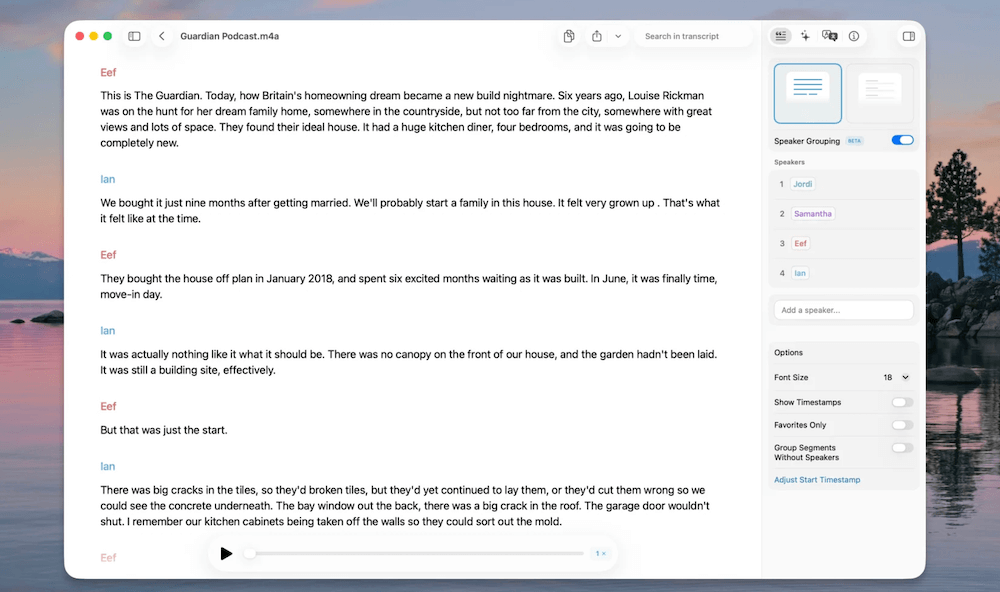
MacWhisper brings OpenAI's Whisper models to macOS. It downloads AI models locally and processes all audio on your Mac - no cloud uploads. It supports both file import (drag-and-drop MP3, WAV, etc.) and real-time recording.
What sets it apart from OfflineTranscribe
- Multiple model sizes: Tiny (fast, less accurate) to Large-V3 Turbo (slower, near-perfect on clean audio). You choose the speed-accuracy tradeoff.
- Rich export formats: TXT, SRT, VTT, and CSV - matching or exceeding OfflineTranscribe's output options.
- Real-time dictation: Speak directly into MacWhisper, unlike OfflineTranscribe's file-only workflow.
- Batch transcription: Process multiple files in one session.
- Apple Silicon optimized: Runs fast on M1/M2/M3/M4 chips using the Neural Engine.
Realistic downside
- Mac only - no Windows or iPhone version (though Whisper Notes at $4.99 covers iOS+Mac with a simpler feature set).
- Pro license ($79.99 lifetime) required for larger, more accurate models.
- Model downloads can be large (several GB for the best accuracy).
whisper.cpp - the free, open-source option
whisper.cpp - free offline transcription for any platform
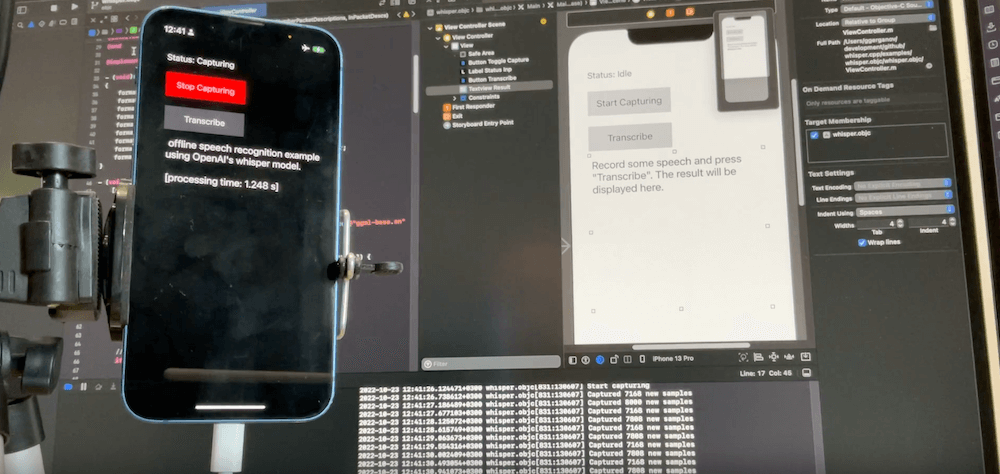
whisper.cpp is a C/C++ port of OpenAI's Whisper model that runs on Windows, Mac, and Linux. It's completely free, fully open-source, and processes everything locally. No account, no license key, no subscription.
What sets it apart from OfflineTranscribe
- Free forever: Zero cost vs. €49.99/year for OfflineTranscribe.
- Cross-platform: Runs on Windows, macOS, and Linux from the same codebase.
- GPU acceleration: Supports Metal (Mac), Vulkan, and CUDA for faster processing.
- CLI batch processing: Script it to process hundreds of files. Shell loops handle bulk transcription.
- Accuracy: Uses the same Whisper model architecture. On a 2021 MacBook Pro, transcription finishes in under 2 seconds for short clips.
Realistic downside
- Requires compiling from source code. You need developer tools installed (cmake, a C++ compiler).
- No graphical interface - everything runs in the terminal.
- No real-time recording built in. You record audio separately, then feed files to the tool.
- Troubleshooting is on you. Community support via GitHub issues, but no customer service.
When to pick each tool
The right choice depends on where you capture audio and how technical you want to get:
- Stay with OfflineTranscribe if: You work primarily on a Windows PC and need to batch-process pre-recorded audio files with SRT output. The annual license and CLI tool suit studio and production workflows.
- Pick VoiceScriber if: You record on an iPhone and need instant, private transcription on the go. No file transfers, no desktop required. Best for voice notes, interviews, meetings, and anyone switching from cloud transcription.
- Pick MacWhisper if: You're on a Mac and need both file-based and real-time transcription with multiple export formats. The closest feature-for-feature match to OfflineTranscribe on macOS.
- Pick whisper.cpp if: You're comfortable with the terminal, want zero cost, and need cross-platform support. Best for developers, researchers, and anyone who already uses command-line tools daily.
Many users combine two tools: VoiceScriber on iPhone for capturing audio in the field, and MacWhisper or whisper.cpp on desktop for batch-processing longer recordings. The common thread is that audio stays local at every step.
FAQs
Is OfflineTranscribe available for iPhone?
No. OfflineTranscribe runs only on Windows 10 and Windows 11. There is no iPhone, iPad, or mobile version. For offline transcription on iPhone, VoiceScriber is the closest alternative - it processes audio entirely on-device with 100+ language support.
Can I run OfflineTranscribe on a Mac?
No. OfflineTranscribe has no macOS build. MacWhisper is the most direct Mac alternative - it uses the same Whisper AI model family, runs locally, and supports similar audio formats and SRT export.
Is VoiceScriber as private as OfflineTranscribe?
Yes. Both tools process audio entirely on your device with no cloud uploads. VoiceScriber's App Store privacy label states "Data Not Collected." The difference is platform: OfflineTranscribe runs on Windows, VoiceScriber runs on iPhone.
How does pricing compare between OfflineTranscribe and VoiceScriber?
OfflineTranscribe costs €49.99 per year (recurring). VoiceScriber offers a $49.99 lifetime option - one payment, no renewals. Over two years, OfflineTranscribe costs roughly €100 while VoiceScriber stays at $49.99. VoiceScriber also has a $5.99/week option and a free 5-minute trial.
Can VoiceScriber produce SRT subtitle files like OfflineTranscribe?
No. VoiceScriber outputs text that you can copy, share, or export - but it doesn't generate timed SRT subtitles. If you need SRT files, MacWhisper ($29.99/year) or whisper.cpp (free) both support SRT, VTT, and other subtitle formats.
Does VoiceScriber support the same audio file formats?
VoiceScriber works differently - it records and transcribes in real time rather than importing pre-recorded files. You speak into your iPhone and get text instantly. If you need to transcribe existing audio files (MP3, WAV, FLAC), MacWhisper or whisper.cpp are better suited for that workflow.
Is whisper.cpp hard to set up?
It requires basic developer tool knowledge. You need to clone the GitHub repository, install cmake and a C++ compiler, build the project, and download model files. On a Mac with Xcode installed, the process takes about 10 minutes. If you've never used a terminal, MacWhisper offers the same Whisper models with a graphical interface.
Which tool has the best transcription accuracy?
All four tools use AI model architectures based on or similar to OpenAI's Whisper. Accuracy depends more on audio quality (background noise, microphone distance, accent) than on the specific tool. With clean audio, all deliver strong results across supported languages.
Can I use VoiceScriber and OfflineTranscribe together?
Yes, and many users do. Use VoiceScriber on iPhone for quick voice notes and on-the-go capture, then use OfflineTranscribe on your Windows PC for batch-processing longer audio files with SRT output. Both keep your data local.
Does OfflineTranscribe require internet to work?
Only for initial license activation and downloading AI models. After that, all transcription runs offline. VoiceScriber and MacWhisper follow a similar model - initial download from the App Store, then fully offline operation.
What if I need offline transcription on Android?
None of these tools support Android natively. VoiceScriber is iPhone-only, OfflineTranscribe is Windows-only, and MacWhisper is Mac-only. For Android, look into apps like Transcriber (which uses on-device Whisper models) or set up whisper.cpp on a companion desktop.
Sources
- OfflineTranscribe. Official website and product details.
- MacWhisper. Product page on Gumroad.
- whisper.cpp. GitHub repository.