
No. Wispr Flow does not transcribe speech offline on iPhone, Android, Mac, or Windows. Wispr's own documentation says Flow needs an internet connection for voice transcription and that transcription always occurs in the cloud. On iPhone, a failed recording can be saved locally and retried once you reconnect, but the text is still created on Wispr's servers, not on your device.
This question reflects a broader buying pattern: our analysis of 1,000 reported voice-to-text searches found that competitor research generated 45.0% of impressions, while explicit offline and local searches produced the highest CTR among purchase-intent categories.
Quick summary:
- Wispr Flow requires internet to turn speech into text on every platform. There is no true offline mode. (Wispr Flow Help Center)
- Android has no offline transcription at all, and it requires Android 13 or later. (Android system requirements)
- On iPhone, if you lose signal mid-dictation, Wispr saves the audio for most failure cases and lets you retry later. That is recovery, not offline transcription. (iOS unstable-internet guidance)
- Privacy Mode and Zero Data Retention change how your data is kept or used. They do not move transcription onto your device. (Wispr Flow Data Controls)
- If your real requirement is transcription that works in Airplane Mode, you need an on-device app. VoiceScriber records and transcribes entirely on your iPhone, with 100+ languages, no account, and $49.99 lifetime access or $5.99/week.
TL;DR
Wispr Flow is a strong cloud dictation tool, but it is not an offline app. Its Data Controls page states that transcription always occurs on the cloud, and its Help Center lists internet as a requirement. If you need speech-to-text that works on a plane, in a basement, or in the field with no signal, you need on-device transcription. VoiceScriber runs 100% on your iPhone: no internet, no upload, no account, and a $49.99 one-time option instead of another monthly subscription.
Does Wispr Flow work offline on iPhone, Mac, Windows, and Android?
Here is the platform-by-platform verdict, based on Wispr's own published documentation as of July 2026. Recheck the current pages before you rely on this, because vendors update requirements often.
| Platform | Offline speech-to-text? | What the documentation says |
|---|---|---|
| iPhone (iOS) | No | Transcription needs internet. Failed audio can be saved locally and retried after you reconnect. (iOS guidance) |
| Android | No | Offline transcription is explicitly not available. Android 13 or later is required. (Android requirements) |
| macOS | No | Internet is listed as a requirement. Flow needs a connection for voice transcription. (What is Flow?) |
| Windows | No | Internet is listed as a requirement. Flow needs a connection for voice transcription. (What is Flow?) |
The pattern is consistent across every device: Wispr Flow can record and buffer, but the actual speech-to-text step happens on Wispr's servers. No connection means no transcript.
Need transcription that works with the Wi-Fi off? Try VoiceScriber, the on-device iPhone app that transcribes in Airplane Mode. Free to start, no account required.
What happens if you use Wispr Flow in Airplane Mode?
This is where most confusion starts, because "recording" and "transcribing" are two different steps. Wispr Flow can do the first offline in some cases. It cannot do the second. Separating them makes the behavior clear.
| Action | Works offline in Wispr Flow? | Detail |
|---|---|---|
| Convert speech to text | No | The core transcription step runs in the cloud on every platform. (Data Controls) |
| Save failed audio locally | Partly (iPhone) | On iPhone, audio is saved for most failure scenarios so it is not lost. (iOS guidance) |
| Retry after reconnecting | Yes (iPhone) | You can retry from history once you are back online, with no stated retry limit. (iOS guidance) |
| Store transcripts locally | Sometimes | Transcripts, and optionally audio, can be stored locally in some setups. Local storage is not local processing. (Enterprise privacy overview) |
Starting a dictation with no connection
If you open Wispr Flow with Airplane Mode on and try to dictate, there is nothing to turn your speech into text, because that job happens on the server. Wispr's iOS guidance describes a state where the app detects no network at all. You will not get a transcript until you reconnect. (iOS unstable-internet guidance)
Losing connection during dictation
If the signal drops mid-sentence, some words can go missing during the gap. The useful part is that, on iPhone, Wispr saves your audio for most failure cases so the recording itself is not thrown away. When you reconnect, you can retry it from your history. That is genuinely helpful recovery behavior, and Wispr deserves credit for building it. It is still not offline transcription, because the text is produced only after the audio reaches Wispr's servers. (iOS unstable-internet guidance)
Why "saved locally" is not the same as "offline"
A recording sitting on your phone waiting to be sent is not a transcript. Until Wispr's servers process that audio, you have a voice file, not searchable text. For a traveler drafting on a long flight, a field researcher in a dead zone, or a clinician who cannot send audio anywhere, "retry later" does not solve the problem. They need the text now, on the device, with no round trip.
Does Wispr Flow run locally or in the cloud?
In the cloud. Wispr's Data Controls page states plainly that transcription always occurs on the cloud, and its enterprise overview describes audio streaming from the app to Wispr's servers for processing. The device captures and sends. The server listens and returns text. (Data Controls, Enterprise privacy overview)
This matters for a specific reason. Some people see "transcripts stored locally" in Wispr's documentation and assume the app must be doing the work on-device. It does not follow. You can keep a copy of the finished transcript on your phone while the transcription itself still happened on a remote server. Storage location and processing location are two separate facts.
| Data-flow stage | Wispr Flow | VoiceScriber |
|---|---|---|
| Audio transmitted off-device | Yes, audio streams to Wispr servers | No, audio never leaves the iPhone |
| Where speech is processed | Cloud servers | On-device |
| Transcript retained on servers | Depends on Private Cloud Sync and retention settings | No cloud storage |
| Synced across your devices | Yes, via Private Cloud Sync | No cross-device cloud sync |
| Used to improve or train models | Only if Privacy Mode is off | No |
Sources: Wispr Flow Data Controls, Enterprise privacy overview, VoiceScriber privacy.
Is Privacy Mode the same as offline mode?
No, and this is the single most common mistake people make when they research Wispr Flow. Privacy Mode, Private Cloud Sync, and Zero Data Retention are privacy and storage controls. None of them turns transcription into an on-device process. Your audio still travels to the cloud to become text.
| Term | What it actually controls | What it does not do |
|---|---|---|
| Privacy Mode | Stops your dictation from being used to evaluate, train, or improve AI models. (Data Controls) | Does not make transcription offline or on-device. |
| Private Cloud Sync | Controls whether Wispr stores your transcription data on its servers for cross-device access. (Data Controls) | Turning it off does not stop audio being sent for transcription. |
| Zero Data Retention | Data is processed but not kept afterward, under specific settings. (Enterprise overview) | Does not mean your audio was never transmitted. It was. |
| On-device (offline) processing | Speech becomes text on the device, with no server round trip. | This is what Wispr Flow does not offer, and what VoiceScriber does. |
Heads up: Wispr's own pages do not fully agree here. The Data Controls and Privacy pages indicate that full zero-retention behavior needs Privacy Mode enabled and Private Cloud Sync disabled, while a Help Center article uses broader wording that reads as if Privacy Mode alone keeps dictation off Wispr servers. If your work is sensitive enough that the difference matters, test both settings yourself and confirm with Wispr directly rather than trusting a single sentence. Either way, none of these controls changes where the transcription happens.
The short version: transmitted, processed, retained, synced, and trained-on are five different things. Wispr Flow gives you real controls over retention, sync, and training. It does not give you control over the one thing offline users care about most, which is keeping the audio on the device in the first place. For a wider look at what "private" means across apps, see our guide to building a local-first privacy stack on iPhone.
What Wispr Flow is genuinely good at
This is not a hit piece. Wispr Flow is a well-built product, and for the right person it is worth paying for. Being honest about that is what makes the offline verdict trustworthy.
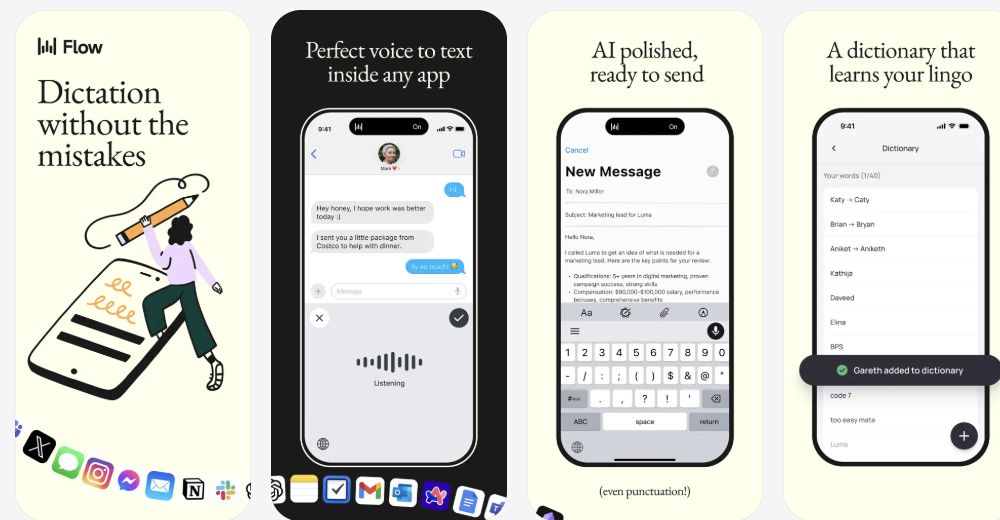
- System-wide dictation: Wispr acts as a voice keyboard across email, chat, docs, and other apps. If your goal is talking instead of typing everywhere, that is its core strength. (Wispr Flow)
- AI cleanup and formatting: It removes filler words and polishes phrasing automatically, which is genuinely useful for fast messaging.
- Cross-platform: It runs on Mac, Windows, iPhone, and Android, so your workflow follows you between devices.
- Team and enterprise features: It offers admin controls, personalization, and enterprise privacy options that a single-purpose recorder does not.
- Broad language support: 100+ languages, similar to VoiceScriber. (Wispr Flow pricing)
If you want a cloud voice keyboard for typing everywhere and you are comfortable with server processing, Wispr Flow is a reasonable buy. For current costs and eligibility, see our Wispr Flow pricing, Growth plans and student claim routes and Wispr Flow vs Otter.ai comparison.
The offline alternative for iPhone: VoiceScriber
If you got to this article because you actually need transcription without internet, the honest answer is that Wispr Flow will not do it, and no privacy toggle will change that. You need an app that runs the speech-to-text engine on the device itself. On iPhone, that app is VoiceScriber.
For a broader buying decision, compare offline dictation alternatives for iPhone, including Apple Dictation, VoiceScriber, Eloquent, Superwhisper, and record-first transcription apps.
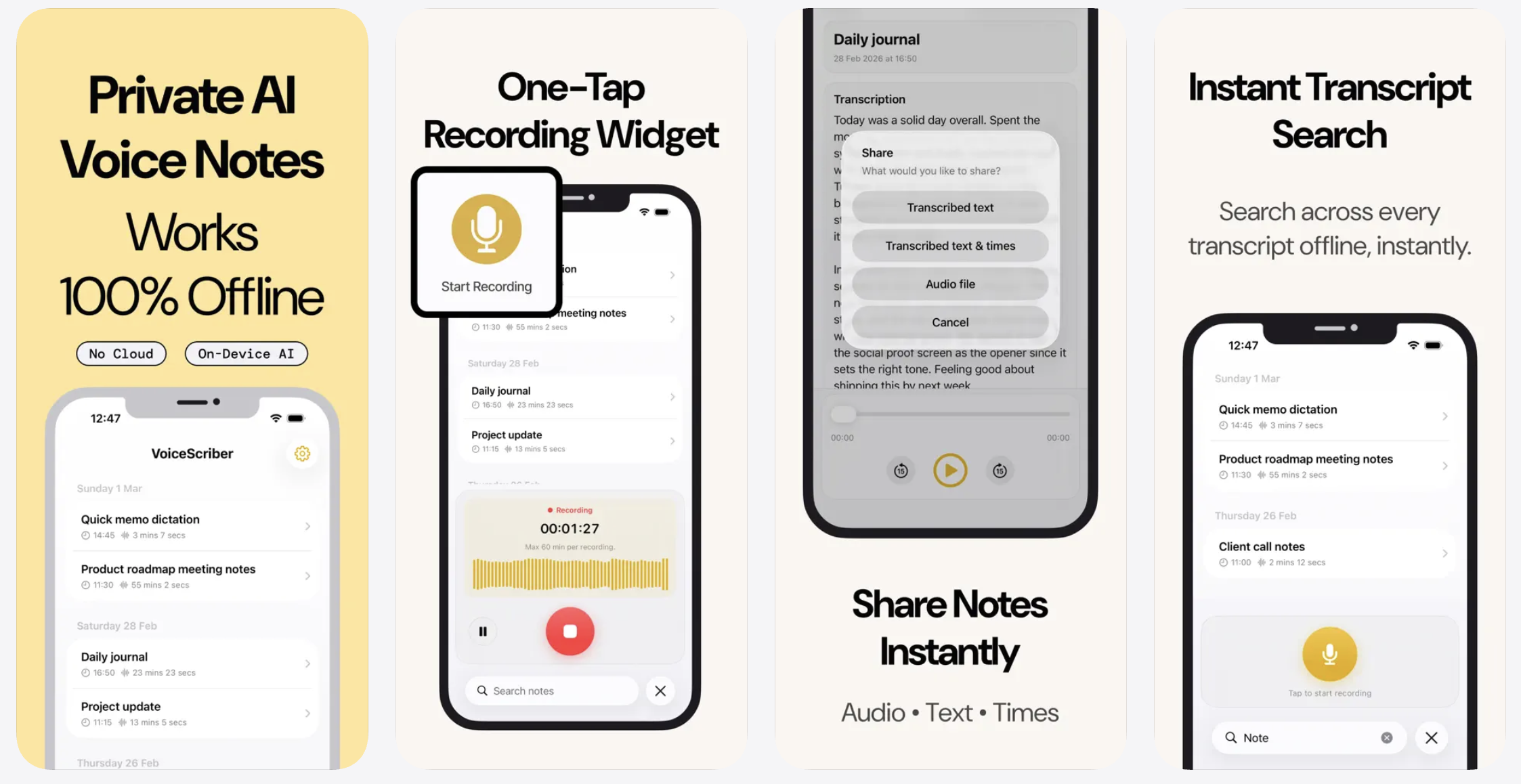
VoiceScriber records and transcribes entirely on your iPhone. Nothing is uploaded, so it keeps working with Wi-Fi and cellular fully off. It is built for the exact job Wispr Flow cannot do offline: capture speech and turn it into searchable, editable text right there on the device.
Why high-intent, privacy-minded users switch
- Truly offline: Transcription runs on-device, so it works in Airplane Mode, on planes, in basements, and in the field. Your audio and transcripts stay on your iPhone. (VoiceScriber)
- No account, no upload: Download it and start recording. Nothing to sign up for, nothing sent to a server. Verify it yourself by turning on Airplane Mode before you record.
- 100+ languages, offline: Multilingual transcription without a connection. See our guide to offline multilingual transcription on iPhone.
- Long recordings: Up to 90 minutes per recording, which suits lectures, interviews, and meetings better than short dictation limits.
- Pay once, not monthly: $49.99 for lifetime access or $5.99/week, and it is free to try first. No recurring dictation subscription. See VoiceScriber pricing.
Transcribe with the internet completely off
VoiceScriber records and transcribes 100% on your iPhone. No account, no upload, no monthly fee. Try it free, then choose $49.99 lifetime or $5.99/week. Test it in Airplane Mode in under two minutes.
Download VoiceScriber Scan to download
on your iPhone
Wispr Flow vs VoiceScriber: which one fits your job?
These are adjacent tools that solve different problems. The right pick depends on whether your priority is dictating everywhere online, or transcribing privately offline.
| Criterion | Wispr Flow | VoiceScriber |
|---|---|---|
| Primary job | System-wide voice dictation across apps | Record and transcribe voice notes on iPhone |
| Offline transcription | No | Yes, fully on-device |
| Where processing runs | Cloud | On-device |
| Audio leaves the device | Yes | No |
| Account required to try | Yes | No |
| Platforms | Mac, Windows, iPhone, Android | iPhone |
| Languages | 100+ | 100+ |
| Recording length | Short dictation sessions (minutes) | Up to 90 minutes per recording |
| AI cleanup across apps | Yes, a core strength | Focused on recording, transcribing, editing, and sharing |
| Pricing | Free Basic; Pro $15/month or $12/month billed annually; store-specific in-app prices | $49.99 lifetime or $5.99/week; free to try |
| One-time purchase option | No verified lifetime option | Yes, $49.99 lifetime |
Sources: Wispr Flow pricing, Wispr Flow App Store listing, VoiceScriber pricing, VoiceScriber App Store listing.
Choose Wispr Flow if you need
A cloud voice keyboard for dictating and auto-editing text inside many apps, across Mac, Windows, and mobile, and you are comfortable with server processing and a subscription. (Wispr Flow)
Choose VoiceScriber if you need
Transcription that works with no internet, keeps every recording on your iPhone, needs no account, handles long sessions, and costs a one-time $49.99 instead of another monthly bill. Get VoiceScriber.
To verify the wider workflow, use our guide to checking transcription apps after model setup, in Airplane Mode, and after reopening, then compare purchase options in the best offline transcription apps guide. For alternative-specific positioning, compare the seven best Wispr Flow alternatives for iPhone, Android, Mac, and Windows and the Otter.ai competitors worth switching to.
How to check any dictation app for offline support yourself
You do not have to take anyone's word for it, including ours. Here is a two-minute test you can run on any app that claims to work without internet.
- Install or update the app and complete one normal, online transcription so you know it works.
- Turn on Airplane Mode, and confirm both Wi-Fi and cellular are off.
- Start a fresh dictation or recording from scratch, with no connection.
- Watch what happens: does text appear live, does it show an error or a no-network state, or does it only save audio to retry later?
- Stop, reconnect, and check whether the app now needed the network to finish the transcript.
If text only appears after you reconnect, the app is cloud-based, no matter what the marketing says. If the transcript builds while you are still in Airplane Mode, it is genuinely on-device. Run this test on Wispr Flow and on VoiceScriber back to back and the difference is obvious. You can also use our offline transcription checker to sanity-check an app before you commit.
Related reading
- Wispr Flow alternative for iPhone - offline, no subscription, compared side by side.
- Wispr Flow Pricing Review - free plan limits, Pro cost, and what you get.
- Which Transcription Apps Work Offline? - a setup, Airplane Mode, import, export and reopening verification guide.
- offline transcription software for iPhone, Mac and Windows - why on-device processing wins.
- Does iPhone Dictation Work Offline? - what Apple processes on-device vs on servers.
Frequently asked questions
Does Wispr Flow work in Airplane Mode?
No. Wispr Flow needs an internet connection to transcribe, because the speech-to-text step runs on Wispr's servers. In Airplane Mode you cannot generate a transcript. On iPhone it can save audio to retry later, but the text is only created once you reconnect. (iOS guidance)
Does Wispr Flow need internet on iPhone?
Yes, for transcription. Wispr lists internet as a requirement and states transcription always occurs in the cloud. If you need speech-to-text on iPhone with no connection, use an on-device app like VoiceScriber, which transcribes entirely on the device. (Data Controls)
Does Wispr Flow run locally or in the cloud?
In the cloud. Audio streams from the app to Wispr's servers, where it is turned into text, then returned to you. Wispr can keep transcripts locally afterward, but that storage is separate from processing. The transcription itself is not done on your device. (Enterprise privacy overview)
Is Wispr Flow's Privacy Mode the same as offline transcription?
No. Privacy Mode controls whether your dictation is used to train or improve AI models, and it affects retention. It does not move transcription onto your device. Your audio still goes to the cloud. Offline transcription, where audio never leaves the phone, is a different thing entirely. (Data Controls)
What is Private Cloud Sync?
Private Cloud Sync controls whether Wispr stores your transcription data on its servers so it is available across your devices. Turning it off changes storage and syncing. It does not stop your audio from being sent for transcription in the first place. (Data Controls)
What does Zero Data Retention mean?
Zero Data Retention means your data is processed but not kept afterward, under specific settings. It is a statement about what happens after processing, not about transmission. Your audio is still sent to a server to be transcribed. "Not retained" is not the same as "never uploaded." (Enterprise privacy overview)
Can I retry a failed Wispr Flow recording later?
On iPhone, yes. If a dictation fails because of a bad connection, Wispr saves the audio for most failure scenarios and lets you retry it from your history once you are back online, with no stated retry limit. You still need internet for that retry to produce text. (iOS guidance)
Does Wispr Flow work offline on Android, Mac, or Windows?
No. Android documentation says offline transcription is not available and requires Android 13 or later. Mac and Windows both list internet as a requirement for voice transcription. No Wispr Flow platform transcribes offline. (Android requirements, What is Flow?)
What is the best offline alternative to Wispr Flow on iPhone?
VoiceScriber is the best fit if your priority is offline iPhone transcription. It records and transcribes on-device, works in Airplane Mode, supports 100+ languages, needs no account, and offers $49.99 lifetime access or $5.99/week. It is built for the offline recording job, not cross-app cloud dictation.
Is VoiceScriber really offline?
Yes. All transcription runs on the device, so recordings and transcripts never leave your iPhone and there is no cloud upload. The easiest way to confirm it is to turn on Airplane Mode and record. Download VoiceScriber and test it yourself in under two minutes.
Does VoiceScriber require an account or a subscription?
No account is required to try it, and a subscription is optional. You can download VoiceScriber and start recording immediately. When you are ready, choose $49.99 one-time lifetime access or $5.99/week. There is no monthly dictation subscription to manage.
The bottom line
The question behind "does Wispr Flow work offline" is really a question about your workflow. If you want a cloud voice keyboard for dictating across apps and server processing is fine, Wispr Flow is a solid choice. But if you searched this because you need transcription that keeps working with no signal and keeps your audio on your phone, Wispr Flow cannot do that, and no privacy setting will change it. For that job, VoiceScriber is built exactly right: on-device, offline, no account, one-time price. Turn on Airplane Mode and prove it to yourself in two minutes.
Sources
- Wispr Flow. What is Flow? (Help Center).
- Wispr Flow. Data Controls.
- Wispr Flow. Android system requirements.
- Wispr Flow. iOS: missing audio chunks during unstable internet.
- Wispr Flow. Privacy Mode & Data Retention.
- Wispr Flow. Enterprise privacy and security overview.
- Wispr Flow. Privacy.
- Wispr Flow. Pricing.
- Wispr Flow. iOS App Store listing.
- VoiceScriber. Website, Pricing, and Privacy.
- VoiceScriber. iOS App Store listing.