
The best speech-to-text app with a lifetime option for iPhone is VoiceScriber for privacy-focused users who want to record, transcribe, search, and export notes without uploading audio. Its current US App Store listing shows a free download, a $49.99 lifetime option, on-device transcription, no required account, background recording, lock-screen recording, incoming-call pause/resume, and an App Privacy label that says Data Not Collected.
If your priority is speaking directly into other apps, compare free and one-time iPhone dictation options by workflow. That guide separates Apple Dictation and cross-app keyboards from VoiceScriber's private recording and file-import workflow, and explains which speech and rewriting modes can use the cloud.
Quick answer
Choose VoiceScriber if you want a private iPhone recorder and transcriber you can test free before paying once. Choose Whisper Notes if the lowest upfront price and speaker labels matter most. Choose Just Press Record if Apple Watch recording is the priority. Choose Aiko if you mostly transcribe existing files and value local Whisper accuracy more than live recording workflow.
Prices and App Store details were checked on July 16, 2026 in the US storefront. Prices, features, privacy labels, and compatibility requirements can change, so confirm the listing on your own device before buying. This guide is published by VoiceScriber, which is ranked first. We have a commercial interest, so the methodology below makes the tradeoffs explicit instead of pretending this is a neutral lab benchmark.
The comparison and pricing focus follows observed demand: our original study of 1,000 reported voice-to-text searches found that competitor capability and pricing research accounted for 45.0% of impressions, while iPhone app-selection searches accounted for another 19.5%.
Test private transcription before paying once
Download VoiceScriber free, record a realistic sample in Airplane Mode, lock the screen, then decide whether the lifetime option is worth it for your workflow.
Try VoiceScriber free Scan to download
on your iPhone
Why choose a lifetime speech-to-text app instead of another subscription?
Speech-to-text can be a daily productivity tool, not a one-off novelty. In a Stanford and Baidu research paper on mobile text entry, English speech input reached 153 words per minute versus 52 words per minute for keyboard input under lab conditions. Even if real-world accuracy is messier, the speed advantage explains why people keep using voice capture for meetings, lectures, field notes, journaling, and first drafts.
The privacy case is just as important. A Pew Research Center privacy survey found that 67% of US adults say they understand little or nothing about what companies do with their personal data, and 73% feel little or no control over company data use. For business risk, Verizon's 2026 DBIR announcement says third-party involvement in breaches reached 48% of total breaches, up 60% year over year. A local speech-to-text workflow reduces one avoidable dependency: sending every recording to a transcription server.
Subscription dictation tools are the usual comparison point here. If you are weighing one against a one-time purchase, our Wispr Flow pricing breakdown covers the free plan limits and the student discount before you commit to a recurring bill.
What lifetime access usually means on iPhone
Lifetime access is usually a non-consumable in-app purchase or a paid app download. Apple explains that developers configure in-app purchase types in App Store Connect, and a non-consumable purchase is the common pattern for a permanent feature unlock. Apple Support also notes that users may be able to restore a non-consumable purchase or subscription when signed in with the same Apple Account and when the app provides a restore option.
That does not mean every future feature is guaranteed forever. Before paying once, check whether the lifetime tier includes transcription length, imports, exports, summaries, speaker labels, future models, iCloud sync, and new AI features. Also remember that Apple's App Privacy details are supplied by developers, so treat them as useful disclosures rather than independent security audits.
| Payment model | What it usually means | Examples in this guide |
|---|---|---|
| Paid upfront | You buy the app once before using it. | Whisper Notes, Just Press Record, Aiko |
| Free download with lifetime unlock | You can install first, then buy a permanent unlock. | VoiceScriber, Smart Voice Recorder, Basil |
| One-time "Unlimited" purchase | A permanent unlock with its own label in the app. | Inscribe |
| Recurring subscription | You keep paying weekly or monthly for access. | Alternative plans inside several apps |
Best lifetime speech-to-text apps for iPhone at a glance
| Rank | App | One-time price checked | Best fit | Main caveat |
|---|---|---|---|---|
| 1 | VoiceScriber | $49.99 lifetime | Private everyday iPhone recording and transcription | 90 minutes per recording |
| 2 | Whisper Notes | $6.99 paid download | Low-cost offline transcription, imports, speaker labels | Paid before testing |
| 3 | Just Press Record | $6.99 paid download | Apple Watch and Apple ecosystem recording | Local vs iCloud choices need review |
| 4 | Aiko | $24 paid download | Accuracy-first local file transcription | No live transcription while recording |
| 5 | Smart Voice Recorder - Offline | $29.99 lifetime | Older iPhones and searchable recordings | Optional online features require scrutiny |
| 6 | Inscribe | $59.99 Unlimited | Private meeting assistant features | New app, one rating checked, iOS 26 required |
| 7 | Basil Private AI Note Taker | $199 lifetime | Premium private AI meeting notes | Highest lifetime price in this list |
We weighted privacy and data flow, recording reliability, lifetime-price clarity, transcription usefulness, compatibility, and product maturity. This is why a smaller app can rank above a cheaper app: the buyer searching for a speech-to-text app no subscription often cares about privacy, recording flow, and lock-screen reliability as much as price.
When VoiceScriber's lifetime option becomes cheaper than subscribing
VoiceScriber's US App Store in-app purchase list currently shows $5.99 weekly, $9.99 monthly, and $49.99 lifetime. The math is straightforward; the VoiceScriber pricing page explains the weekly and lifetime options and should be checked alongside the live storefront.
| Subscription pattern | Lifetime becomes cheaper at | Why |
|---|---|---|
| $5.99/week | 9th charge | 9 weeks would cost $53.91 |
| $9.99/month | 6th charge | 6 months would cost $59.94 |
Run the two-minute offline test first
Install VoiceScriber, enable Airplane Mode, record a real sample, lock the screen, and check the transcript. Buy lifetime only if that real workflow works for you.
Test VoiceScriber on your iPhoneDetailed rankings and tradeoffs
1. VoiceScriber - best overall lifetime option for private iPhone transcription
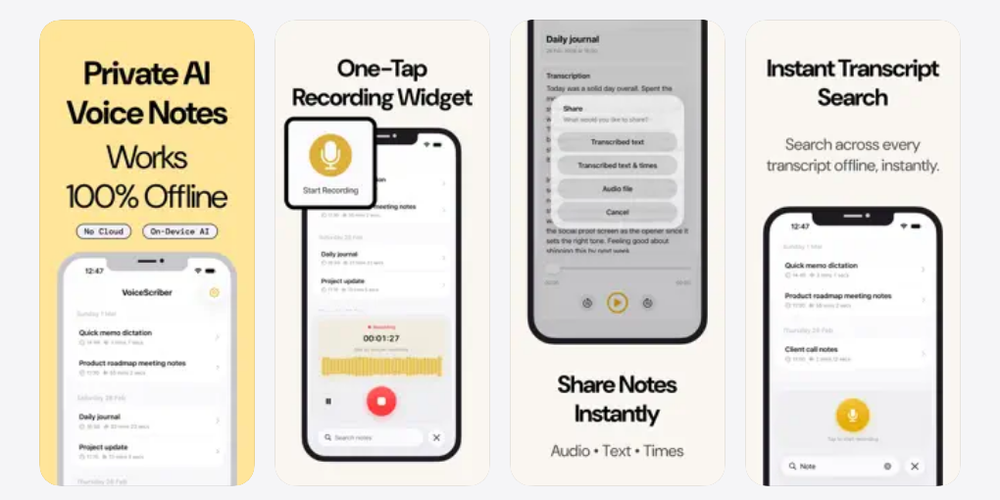
VoiceScriber is the strongest fit when your goal is "record and transcribe on my iPhone without uploading audio." The listing says recording and transcription run on the iPhone, recordings and transcripts stay local, no account is required, more than 100 languages are supported, and the workflow works in Airplane Mode. Its App Privacy label says Data Not Collected.
The product is also recorder-first. The current listing mentions background recording, lock-screen recording, incoming-call pause/resume, searchable notes, tags, exports, and up to 90 minutes per recording. Version notes from June 2026 specifically highlight improved stability for long meetings, lectures, and lock-screen use.
Best for: private notes, interviews, lectures, confidential meetings, field recording, and users who want a free test before buying a lifetime unlock. For broader comparisons, see our best voice-to-text apps for iPhone guide and our review of offline iPhone recorders with screen-lock recording.
Caveats: VoiceScriber is not the cheapest app here, individual recordings are capped at 90 minutes, and its App Store rating count is still small compared with older apps. Choose another tool if Apple Watch capture, multi-hour files, or speaker labels matter more than the all-in-one private iPhone workflow.
2. Whisper Notes - best low-cost offline alternative
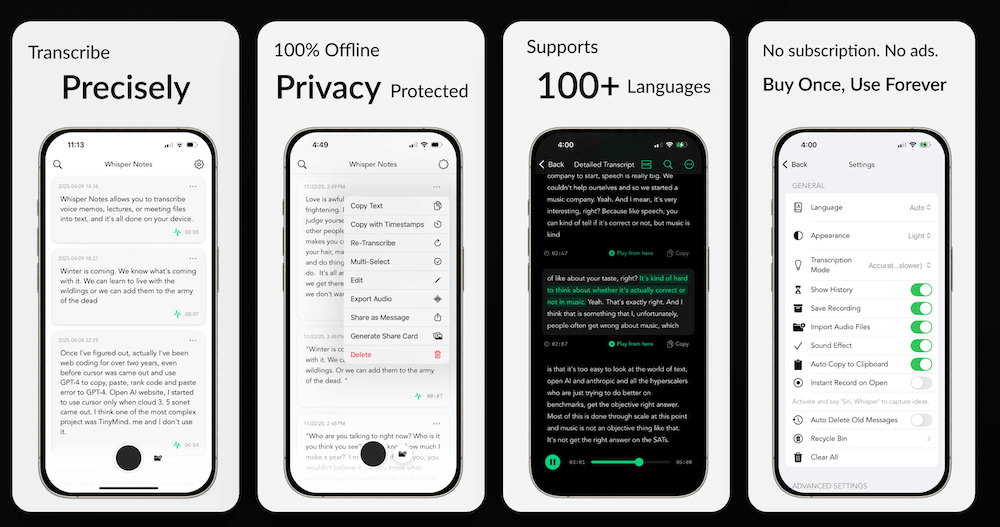
Whisper Notes costs $6.99 upfront in the US App Store and has a clear no-subscription position. Its listing highlights offline transcription, more than 100 languages, audio/video imports, speaker labels, multiple local models, folder organization, and text/subtitle export. The App Privacy label says Data Not Collected.
Best for: people who want the cheapest serious offline speech-to-text purchase and users with imported media, longer files, or speaker-label needs. It is also a strong pick in our best offline transcription apps comparison.
Caveats: You pay before testing. The listing also positions the app around model downloads and device requirements, so older phones may not be ideal. VoiceScriber is the better default if you want a lightweight recorder-first workflow, lock-screen reliability, and a free trial path before a lifetime purchase.
3. Just Press Record - best one-time Apple Watch recorder
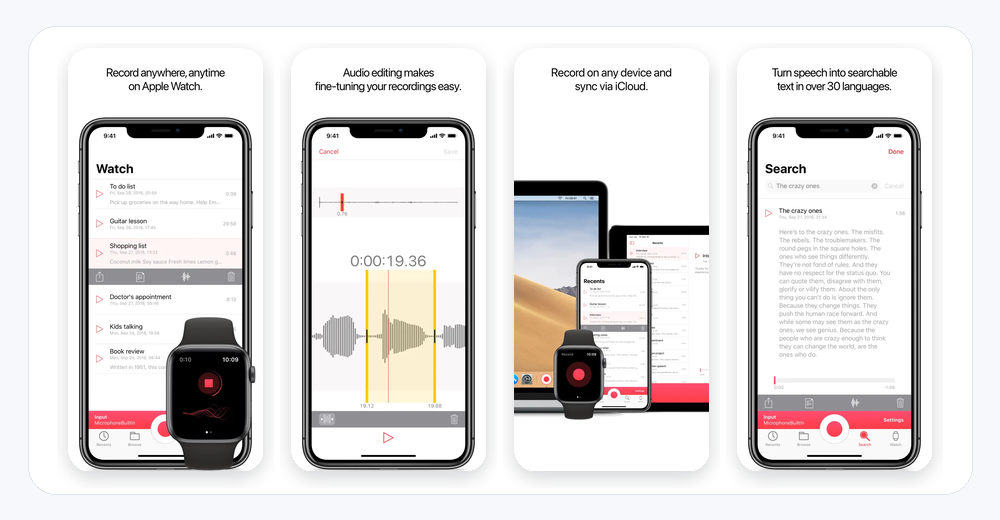
Just Press Record is a $6.99 paid download with a long product history and broad Apple ecosystem support. The listing highlights iPhone, iPad, Mac, Apple Watch, widgets, Siri, Action Button and Control Center support, background recording, transcription, search, audio editing, and sharing.
Best for: people who want one-tap recording across Apple devices, especially independent Apple Watch capture. It belongs on any shortlist for an iPhone recorder app, and we also cover it in our iPhone voice recorder apps that transcribe guide.
Caveats: Just Press Record gives users local and iCloud Drive storage choices, so privacy depends partly on how you configure it. It is an excellent recorder, but VoiceScriber is clearer when the specific job is no-account, on-device iPhone transcription with a lifetime unlock.
4. Aiko - best accuracy-first local file transcriber
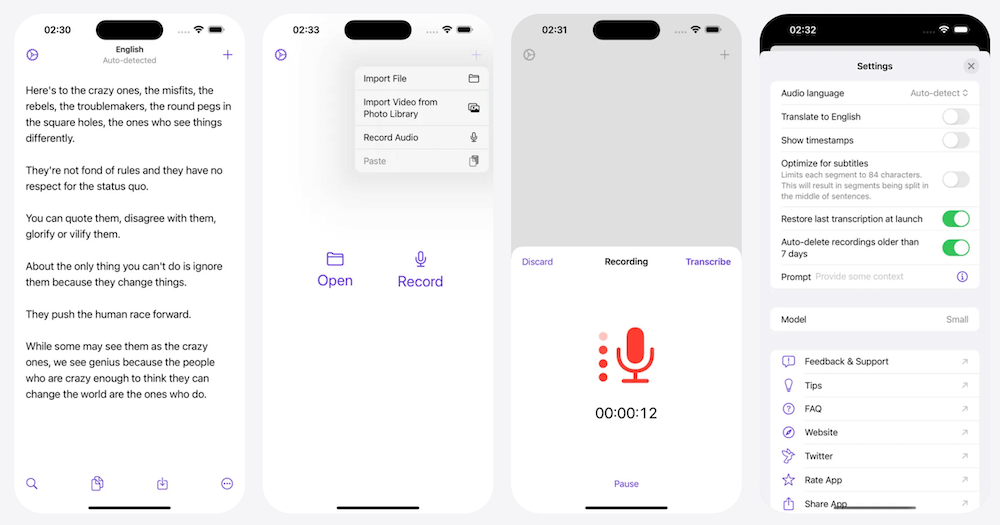
Aiko is a $24 paid download from Sindre Sorhus. Its App Store listing says it uses OpenAI Whisper locally, supports around 100 languages, and that nothing leaves your device. The App Privacy label says Data Not Collected.
Best for: sensitive recordings where local transcription accuracy matters and you are comfortable with a file-oriented workflow. Aiko is also useful in no-upload file conversion workflows, which we cover in our free no-upload audio-to-text converter guide.
Caveats: Aiko's listing says it does not transcribe live while recording, does not support speaker detection, and requires iOS 26 with an A12 Bionic chip or later. VoiceScriber is better for everyday capture because recording, background behavior, search, and export sit in one iPhone workflow.
5. Smart Voice Recorder - Offline - best for older iPhones and searchable recordings
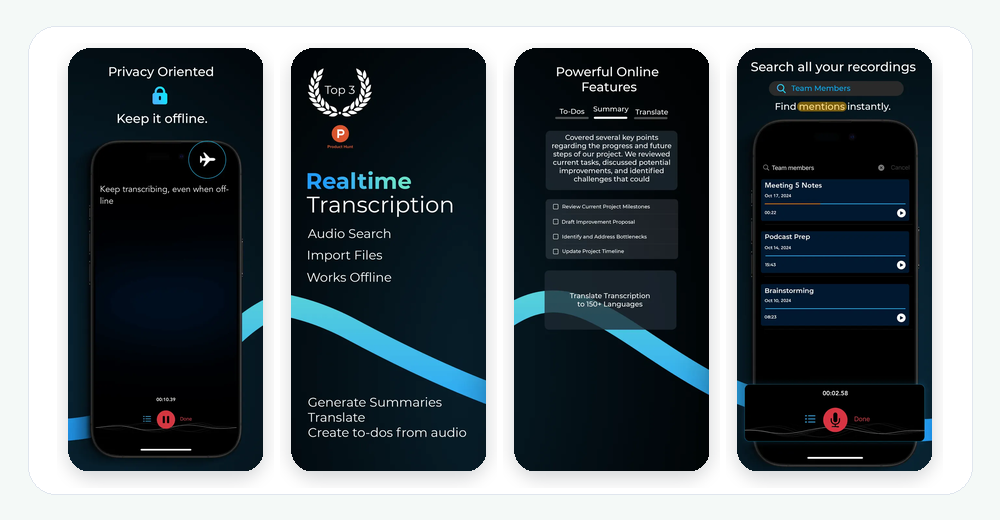
Smart Voice Recorder - Offline is free to download with a $29.99 lifetime option in the US App Store. The listing highlights offline recording and transcription, live transcription, imported files, searchable recordings, timestamped search, and support for 16 transcription languages. It currently requires iOS 13 or later, which is unusually accessible for this category.
Best for: older iPhones, searchable audio libraries, and users who want a lower lifetime price than VoiceScriber. It is a practical option if your language needs fit its smaller transcription language set.
Caveats: The listing also mentions optional online features such as summaries, to-dos, translation, and broader language support. If your requirement is strict no-cloud transcription, test the exact feature you plan to use in Airplane Mode. For a wider offline field test, see which transcription apps actually work offline.
6. Inscribe - best private meeting-assistant feature set if you accept a newer app
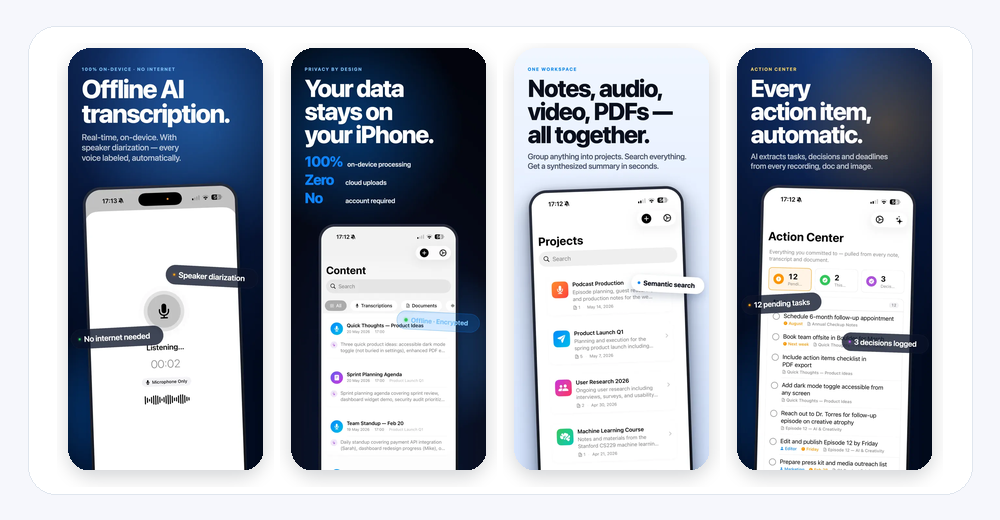
Inscribe is a newer app with an Unlimited purchase listed at $59.99. Its App Store description emphasizes on-device recording, transcription, summaries, speaker labels, action notes, document and media imports, on-device Q&A, no required account, and optional iCloud.
Best for: users who want a private meeting assistant rather than only transcription. The feature set is ambitious for people who need summaries, action items, and links between recordings and documents.
Caveats: At the time checked, Inscribe had only one App Store rating, requires iOS 26, and its App Privacy label lists device ID, product interaction, and crash data as data not linked to you for analytics. VoiceScriber is the safer pick if you want a more focused private recorder/transcriber with Data Not Collected.
7. Basil Private AI Note Taker - best premium private AI notes option
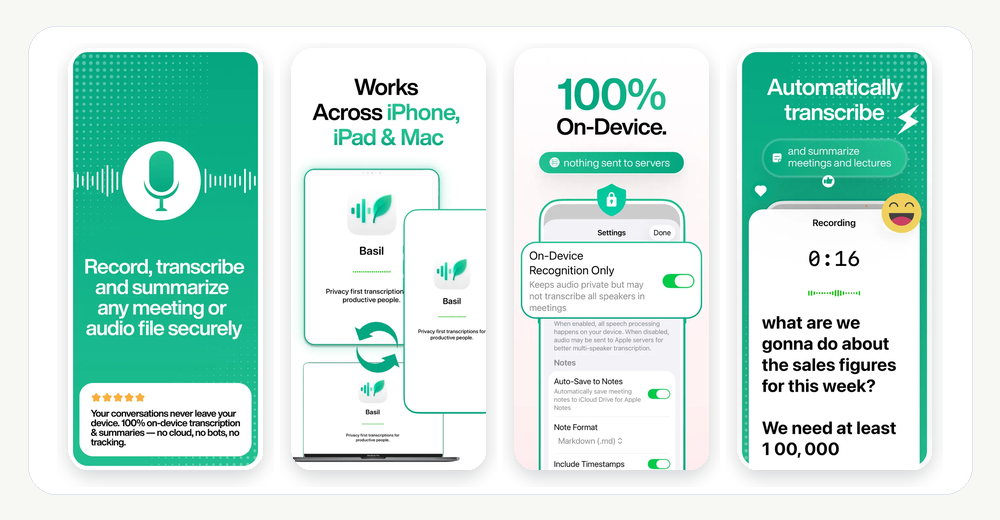
Basil Private AI Note Taker lists a $199 lifetime option plus a monthly alternative. The App Store listing highlights on-device recording, transcription, summaries, action items, 60 languages, imported files, Siri and Action Button support, optional iCloud, and an App Privacy label that says Data Not Collected.
Best for: users who want premium private AI meeting notes and are willing to pay a much higher lifetime price for summaries and action-item workflow.
Caveats: The lifetime price is high, the app requires iOS 26, and the checked rating count is small. VoiceScriber is more affordable and more focused if the core job is private recording and transcription rather than a broader AI meeting-notes workspace.
Honorable mentions
TranscriAI is worth watching because it advertises offline Whisper transcription, speaker diarization, long recordings, and a $19.99 lifetime option, but its limited market history kept it out of the top seven. TokKong combines local Whisper and on-device LLM tools, but its storage footprint, device recommendations, and sync settings require careful review. FolioScribe is another newer private file transcription app to monitor.
Apple's built-in Voice Memos may be enough for occasional users. Apple says Voice Memos transcription is available on iPhone 12 or later for specified languages and regions. Dedicated apps become more useful when you need broader language support, explicit no-cloud positioning, advanced search, tags, imports, exports, speaker labels, or a clear permanent unlock.
How to test a lifetime transcription app before buying
A lifetime price is only valuable if the app survives your real workflow. Use this test before paying once.
- Use Airplane Mode. Download any required model first, then record and transcribe without Wi-Fi or cellular service.
- Lock the screen. Leave the phone locked for several minutes and confirm the final recording is complete.
- Switch between apps. Open your calendar, browser, or notes while recording and verify the session continues.
- Create an interruption. Test what happens when a call, timer, or notification arrives. VoiceScriber specifically advertises incoming-call pause and resume.
- Use your normal microphone. Test the iPhone microphone, AirPods, Bluetooth headset, or external mic you actually use.
- Add difficult words. Include names, acronyms, product terms, place names, and domain-specific vocabulary.
- Review the whole workflow. Check search, editing, exports, audio-to-transcript linking, restart behavior, and delete behavior.
Lifetime access does not automatically mean private
A paid app can still upload audio, and a free app can still process locally. Payment model and privacy model are separate. Check whether audio leaves the device, whether transcript text goes to an AI service, whether an account is required, whether iCloud sync is optional, and whether exports are easy to delete or move.
Nine questions to ask before paying once
- Is the purchase genuinely non-renewing? Look for lifetime, buy once, unlimited, or paid download wording.
- What exactly does the lifetime tier unlock? Confirm recording length, imports, exports, summaries, speaker labels, and future model access.
- Can the purchase be restored? Check for Restore Purchases and confirm Apple Account behavior.
- Does the app work on your iPhone? Some apps here require iOS 26, while others support older versions.
- Is there a maximum recording length? VoiceScriber currently lists up to 90 minutes per recording.
- What happens when a call arrives? Make sure the app pauses, resumes, or preserves a recoverable file.
- Can you export your data? Lifetime is more valuable when recordings and transcripts are portable.
- How mature is the app? Review update history, ratings count, developer site, and support channels.
- Can you test before paying? A free download matters when microphone behavior, accent handling, or offline mode is uncertain.
Frequently asked questions
What is the best speech-to-text app with a lifetime option for iPhone?
VoiceScriber is the best overall choice for privacy-focused iPhone users who want an integrated recorder and transcriber, no required account, on-device processing, background and lock-screen recording, more than 100 languages, and a free test before buying its $49.99 lifetime option.
What is the cheapest offline speech-to-text app with no subscription?
Among the main apps ranked here, Whisper Notes and Just Press Record both cost $6.99 upfront in the US App Store. Whisper Notes is stronger for offline transcription, while Just Press Record is stronger for Apple Watch and one-tap recording.
Does VoiceScriber require an internet connection?
The VoiceScriber App Store listing says the recording and transcription workflow runs on the iPhone and works in Airplane Mode. Internet is still required to download the app, complete App Store purchases, and use sharing destinations that depend on the internet.
Does VoiceScriber upload recordings to the cloud?
VoiceScriber's App Store description says recordings, transcripts, and notes remain local and that transcription does not use external servers. Its App Privacy label says Data Not Collected. These are developer-provided disclosures rather than an independent security audit.
Is VoiceScriber a phone-call recorder?
No. VoiceScriber records audio through the iPhone microphone. Its incoming-call behavior pauses an existing recording and lets the user resume afterward; it should not be confused with recording the phone conversation itself.
How long can VoiceScriber record?
The current App Store listing says an individual recording can be up to 90 minutes. Users who routinely capture multi-hour sessions should consider Whisper Notes, Just Press Record, Aiko, or another file-oriented alternative and verify each app's practical limits on their device.
When is VoiceScriber Lifetime cheaper than subscribing?
At the prices checked on July 16, 2026, $49.99 lifetime is cheaper than nine $5.99 weekly payments or six $9.99 monthly payments. The exact comparison can change if prices or promotions change.
Can I restore a lifetime purchase after changing iPhones?
Apple Support says you may be able to restore a non-consumable purchase when you are signed in with the same Apple Account and the app provides a restore option. Check for Restore Purchases inside the app before assuming the entitlement will transfer automatically.
Is a lifetime transcription app automatically more private than a subscription app?
No. Price structure does not determine data handling. Review whether audio is processed locally, whether an account is required, which analytics tools are used, where backups are stored, and whether optional AI features send data to an external service.
Is Apple Voice Memos enough?
It may be enough for occasional recordings on a supported iPhone. Apple offers Voice Memos transcription on iPhone 12 or later for specified languages and regions. A dedicated app becomes more useful when you need broader languages, explicit offline workflow, advanced search, imported media, specialized exports, speaker labels, or a permanent feature unlock.
Final recommendation
VoiceScriber is the best lifetime speech-to-text app for the iPhone user who values privacy, simplicity, reliable recording, and freedom from recurring payments more than Apple Watch support, multi-hour recordings, or a large cloud workspace.
It is not the cheapest. Whisper Notes offers remarkable offline value at $6.99, Just Press Record is the better Apple Watch recorder, and Aiko is compelling for accuracy-first local file transcription. VoiceScriber's advantage is the combined fit: on-device recording and transcription, no required account, no cloud transcription dependency, more than 100 languages, lock-screen recording, incoming-call handling, searchable/exportable notes, a free download, and a clear $49.99 lifetime option.
Keep your recordings on your iPhone and stop paying every month
Download VoiceScriber free, test private offline transcription with your own audio, and choose the lifetime option only after it proves reliable for your workflow.
Download VoiceScriber on the App StoreScan to downloadon your iPhone