

Otter.ai starts at $0 on Basic. On the US web plan, Pro costs $16.99 per user per month and Business costs $30, or $8.33 and $19.99 per user per month with annual billing, and Enterprise is quoted on request. If you only need your own recordings transcribed on an iPhone, VoiceScriber does it on the device for a one-time $49.99.
Quick answer: Otter Basic is free but stops at 300 minutes a month, 30 minutes per conversation and three lifetime file imports; Pro is $16.99 a month. If you transcribe your own recordings on an iPhone and want them to stay private, choose VoiceScriber: Lifetime is a one-time US$49.99, and transcription runs 100% offline with no audio upload.
Otter.ai plans and prices
These are the standard US web rates and per-user allowances from Otter's plan comparison. Minutes for live recordings, meetings and imports come out of one monthly pool on Basic and Pro, and unused minutes don't roll over. The student and teacher offer is a discount on individual Pro, not a separate tier.
| Plan | Price per user | Transcription minutes | Per-conversation cap | File imports | Members and extras |
|---|---|---|---|---|---|
| Basic | Free | 300 a month | 30 min | 3 lifetime | Up to 5 members; live transcription, speaker ID, playback |
| Pro | $16.99 a month, or $8.33 a month billed annually | 1,200 a month | 90 min | 10 a month | Up to 5 members; full history, DOCX, PDF and SRT export |
| Business | $30 a month, or $19.99 a month billed annually | Unlimited meetings and recordings; 6,000 import min a month | 4 hours | Unlimited | Up to 25 members; 3 concurrent meetings, admin logs |
| Enterprise | Custom quote | Unlimited meetings and recordings; 6,000 import min a month | 4 hours | Unlimited | Unlimited members; SSO and SCIM, API, HIPAA add-on |
| Pro Student & Teacher | $13.59 a month, or $79.99 a year | 1,200 a month | 90 min | 10 a month | 1 user, no workspace features; 20% off Pro |
Prices checked November 20, 2026, in US dollars before tax.
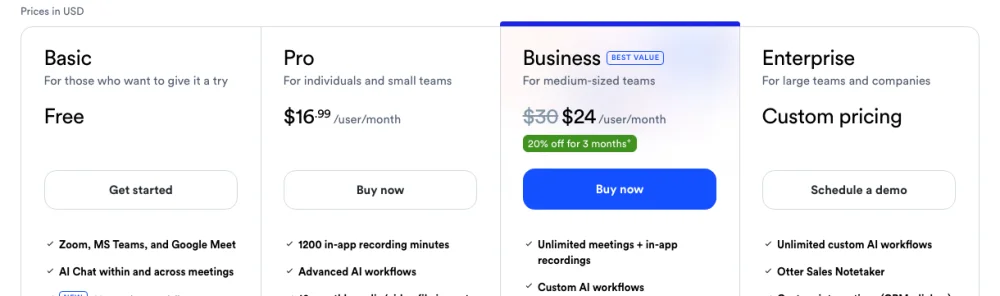
Otter also shows Business at $24 per user per month for the first three months for first-time subscribers. You can pay by card on the web or subscribe inside the Otter iPhone app, in which case Apple bills you and you manage the subscription in your Apple account.
What Otter's free plan includes
Basic covers up to five hours of transcription a month, in pieces of no more than 30 minutes. Record or import a 50-minute interview and the recording keeps going, but Otter says you'll only see the first 30 minutes of the transcript until you upgrade. You can import just three audio or video files over the life of the account, and only your 25 most recent conversations stay visible; older ones are archived.
What you do get is real: live transcription, speaker identification, playback, Zoom, Teams and Google Meet support, and a small AI Chat allowance. Pro adds full conversation history, advanced search and DOCX, PDF and SRT exports, which is why most regular users end up paying.
Which Otter plan should you choose?
Solo or student. Basic works if you mainly record short notes or the occasional call and rarely import files. A 50-minute lecture already runs past the 30-minute cap, though. If you need whole lectures and qualify for the student and teacher discount, individual Pro costs $79.99 a year or $13.59 a month.
Professional. Pro suits regular interviews or client calls if 90 minutes per conversation and 1,200 minutes a month (20 hours, imports included) cover your workload. Pay annually only if you expect to use it all year, because subscriptions don't refund.
Team. Business fits when people need shared meeting notes, several calls running at once, or sessions longer than 90 minutes. It covers three concurrent meetings and adds usage analytics and activity logs.
Enterprise or regulated organization. Ask for a quote if you need custom retention, single sign-on or user provisioning; Otter lists a 100-user minimum for SSO and SCIM. If you handle protected health information, Otter's Enterprise HIPAA add-on requires a signed Business Associate Agreement first. Schools buying for everyone can go through Otter for Education.
Limits and costs people miss
- Minutes reset monthly and don't roll over. On Basic, using all 300 minutes blocks new recordings and imports until the next cycle, and deleting a conversation doesn't give the minutes back. Otter explains when your monthly minutes reset.
- File count, file length and minutes are separate limits. Business and Enterprise allow any number of imports within 6,000 import minutes a month, but the four-hour conversation cap still applies. Otter's import guide covers file types and size.
- Check your language first. Otter supports 17 transcription languages, including English (US and UK), Spanish, French, German, Japanese, Mandarin, Korean, Indonesian and Turkish. You pick the spoken language before recording or importing.
- Subscriptions renew automatically and are non-refundable. Cancel at least 24 hours before the billing date, or pause the plan instead. Web subscribers cancel under Account Settings, then Billing; App Store and Google Play subscribers cancel through the store. Otter's cancellation guide has the steps.
If you're also pricing a dictation tool for typing into other apps, the Wispr Flow pricing breakdown covers its plans and student discount.
Is Otter.ai safe?
Otter can be a reasonable choice for team meetings when your organization allows cloud transcription and everyone agrees to be recorded. It is a cloud service: recordings are stored on AWS and transcribed on Otter's servers. Even when you record without a connection, Otter waits until you're back online, then uploads the audio to produce the transcript.
AI training. Otter's privacy policy (effective June 16, 2026) lists "training our proprietary AI technology on de-identified audio recordings and on transcriptions (which may contain Personal Information)" among its purposes. On its privacy and security page, Otter says outside AI service providers don't use its customer data to train their own models, and that people review audio only with your explicit consent.
Meeting auto-join. With a calendar connected, Otter Notetaker can join Zoom, Google Meet and Microsoft Teams calls on its own. To stop that, go to Integrations, then the Meetings tab, then Default auto-join settings, and choose Meetings I manually select, as Otter's help center explains.
Security controls. Otter reports a SOC 2 Type 2 audit, TLS for data in transit and AES-256 server-side encryption for stored data, and it supports two-factor authentication. For a wider look at how to judge any vendor, see our guide to secure speech-to-text software.
The 2025 privacy lawsuit. A proposed class action, In re Otter.AI Privacy Litigation (No. 5:25-cv-06911, N.D. Cal.), was filed on August 15, 2025. The plaintiffs allege that Otter Notetaker recorded and transcribed meetings without every participant's consent and that Otter used that content to train its models. On August 13, 2026, the court granted Otter's motion to dismiss in part, letting some claims proceed. Otter answered the amended complaint in September 2026, and the docket shows no class certification, settlement or ruling on the merits as of November 20, 2026. The claims are allegations, not findings.
How to use Otter more safely
- Set Notetaker to join only meetings you pick, and check recurring events you changed earlier, since they keep their own setting.
- Tell attendees you plan to record and transcribe, and get their consent before you start.
- Review auto-share settings and conversation permissions so sensitive transcripts reach only the people you choose.
- Turn on two-factor authentication for your Otter account.
Otter vs an on-device iPhone app: cost over a year
The comparison is for one user at standard US web rates, with VoiceScriber's one-time Lifetime purchase. "Works offline" means transcription without a connection; Otter can record offline but transcribes after it uploads the audio.
| App or plan | Price | What you pay over 12 months | Minutes | Where audio is processed | Account required | Works offline |
|---|---|---|---|---|---|---|
| VoiceScriber | $49.99 once (Lifetime) | $49.99 | Up to 90 min per recording or imported file | On your iPhone | No | Yes, 100% offline |
| Otter Basic | Free | $0 | 300 a month, 30 min per conversation | Otter's cloud | Yes | No |
| Otter Pro | $16.99 a month or $8.33 a month billed annually | $203.88 monthly, or about $100 annually | 1,200 a month, 90 min per conversation | Otter's cloud | Yes | No |
| Otter Business | $30 a month or $19.99 a month billed annually | $360 monthly, or about $240 annually | Unlimited meetings and in-app recordings, 4 hours per conversation | Otter's cloud | Yes | No |
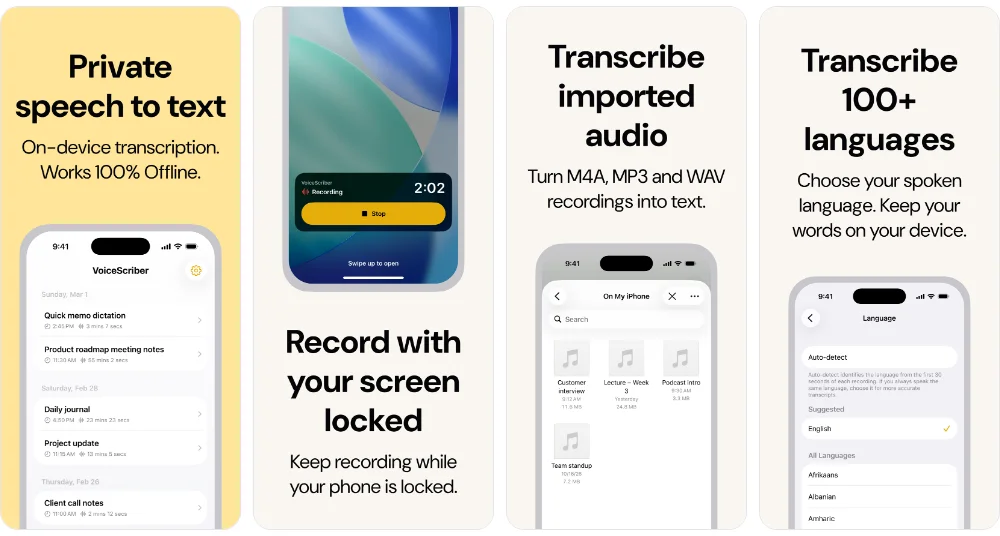
VoiceScriber fits people transcribing their own interviews, lectures and voice memos on an iPhone (iOS 18 or later). It works in Airplane Mode, transcribes in 100+ languages, and keeps recordings and transcripts on the phone unless you share or export them; its App Store privacy label states Data Not Collected. It has no meeting bot, team workspace or speaker labels, so if your team needs shared notes from several calls, Otter Business is the better fit. For the wider trade-off, see on-device vs cloud transcription.
Other alternatives
If you need calendar integrations or shared meeting notes, compare the Otter.ai alternatives for meetings, such as Fireflies and Fathom. To capture an in-person meeting without adding a bot to the call, see the guide to meeting transcription software without bots.
Bottom line
Use Otter Basic for occasional short recordings, Pro for regular interviews and longer sessions, and Business when a team needs shared notes and several meetings covered at once. Check the 30-minute free cap and the training policy before you rely on it for anything sensitive.
If the job is transcribing your own recordings privately on an iPhone, VoiceScriber's one-time $49.99 Lifetime purchase costs less than a year of Pro, and the audio never leaves the device.
FAQs
How much does Otter.ai cost?
Otter Basic is free. On the web, Pro is $16.99 per user per month, or $8.33 per user per month billed annually. Business is $30 per user per month, or $19.99 billed annually, and Enterprise is priced on request. If you only need your own recordings transcribed on an iPhone, VoiceScriber costs a one-time US$49.99 for Lifetime and transcribes 100% offline on the device.
Is Otter.ai free?
Yes. Otter Basic is a permanent free plan with live transcription, speaker identification and playback. It includes 300 transcription minutes a month, but each conversation is capped at 30 minutes and you can import only three files in total.
What are the limits of Otter's free plan?
Otter Basic gives you 300 transcription minutes per month, 30 minutes per conversation and three audio or video imports for the life of the account. Only your 25 most recent conversations stay visible; older ones are archived. Once you use the 300 minutes, you can't record or import until the next monthly cycle, and deleting conversations doesn't give minutes back.
Is Otter.ai safe to use?
Otter reports a SOC 2 Type 2 audit, encrypts data in transit and at rest, and supports two-factor authentication. It processes recordings in the cloud, and its privacy policy says it trains its own AI on de-identified audio and on transcripts. For sensitive meetings, check what your organization allows, get everyone's consent and review the auto-join and sharing settings.
Does Otter.ai use my recordings to train AI?
Otter's privacy policy says it trains its proprietary AI on de-identified audio recordings and on transcriptions, which may contain personal information. Otter says outside AI service providers do not use its customer data to train their own models, and that humans review audio only with your explicit consent.
Is there a cheaper alternative to Otter.ai for iPhone?
For transcribing your own recordings, VoiceScriber costs a one-time US$49.99 for Lifetime, about half of a year of Otter Pro billed annually. It records or imports audio and transcribes it on the iPhone, up to 90 minutes per recording or file. It has no meeting bot or team workspace, so Otter still fits shared team meetings better.
Does Otter.ai have a student discount?
Yes. Otter gives eligible students, faculty and full-time school staff 20% off individual Pro: $13.59 a month or $79.99 a year. You apply with a .edu email address, and workspace features are not included in the discounted plan.
How do I cancel Otter.ai?
For a web subscription, sign in as the owner or an admin and go to Account Settings, then Billing, then Cancel plan, at least 24 hours before the next billing date. If you subscribed through the Apple App Store or Google Play, cancel there. Paid features last until the end of the billing period, then the workspace moves to Basic. Otter subscriptions are non-refundable.
Sources
All sources checked on November 20, 2026.
- Otter pricing: plans and plan comparison, Student & Teacher discount, Otter for Education and the Otter App Store listing.
- Otter limits and billing: Basic plan limits, monthly minute reset, file imports, supported languages, cancel a subscription and Terms of Service.
- Otter privacy and security: Privacy Policy, Privacy & Security, recording offline, Notetaker auto-join, auto-share, conversation permissions, two-factor authentication and HIPAA.
- Court records: order on the motion to dismiss (ECF 68) and the In re Otter.AI Privacy Litigation docket.
- VoiceScriber: App Store listing and product facts.