

Secure speech-to-text software limits where your audio travels, how long it's kept and who can reach it. For confidential iPhone recordings, VoiceScriber transcribes on the device without uploading the audio; if you use a cloud service, check its processing location, retention, training policy and contract before you upload anything sensitive.
Quick answer: For the least audio exposure, choose speech-to-text that transcribes locally without uploading recordings. VoiceScriber does this on iPhone, and Handy does it on a desktop computer. For enterprise cloud transcription, check region, retention, AI training, encryption, access controls and contracts. Offline processing removes one risk; it doesn't make every device or workflow secure.
What makes speech-to-text software secure?
Secure speech-to-text software limits who receives, stores and can use your audio and transcript. In practice that means checking where processing happens, how long data is kept, whether it trains AI models, how it's encrypted, who can access it, what independent assurance backs the claims, and whether offline mode is real. A local app cuts down data transfer, while a managed cloud service may give a regulated organization stronger administrative control.
The 7-point security checklist
- Where audio is processed. Find out whether recognition happens on your device, on a vendor's servers or on infrastructure you control. For cloud tools, ask which region receives and stores the recording, including temporary files and logs. A region setting is not an offline mode.
- Retention and deletion. Look for explicit defaults for raw audio, transcripts, logs and backups, and ask whether deleting a recording removes it for good. Otter, for example, deletes conversations from Trash after 30 days. A local file also stays until you remove the device copy and any backups.
- AI training use. Check whether the provider uses recordings or transcripts to improve its models, and whether that's opt-in, opt-out or set by contract. Amazon says Transcribe may use customer content to improve the service unless the customer opts out. Promising not to sell audio is not the same as promising not to train on it.
- Encryption. Ask for clear statements on data in transit and at rest, including key management. The UK ICO's encryption guidance covers both. For an offline app, ask whether saved transcripts get extra app-level encryption or rely on the operating system. Encryption can't undo an open sharing link or a compromised account.
- Access controls. Check who can see, export and share recordings. For teams, look for role-based access, single sign-on, multifactor authentication, audit logs and fast revocation. NIST's least-privilege principle applies: each person gets only the access the job needs. An app with no account still depends on the device passcode.
- Independent attestations and contracts. A SOC 2 Type II report tests specified controls over time; ISO/IEC 27001 certifies an information security management system. Neither guarantees that a given recording is protected. US healthcare needs a HIPAA Business Associate Agreement where required, and GDPR processing needs an Article 28 data processing agreement. Check scope and dates before relying on any badge.
- Offline mode. Offline can mean fully local transcription, a model you download once, or a recorder that syncs later. Install everything first, turn on Airplane Mode, record a short non-sensitive sample and see whether transcription finishes. Optional summaries or cloud post-processing can still send text out, as Handy's privacy policy explains. Our guide to which transcription apps work offline has more checks.
The checklist matters most for journalists protecting sources, lawyers handling privileged material and teams recording sensitive meetings. In all three cases the original recording can be more sensitive than the finished transcript.
Secure speech-to-text software compared
The table compares documented controls, not an overall security score. "Partial" means the answer depends on configuration, plan or workflow; "Not disclosed" means we found no public statement.
| Tool | Processing | Retention | AI training | Encryption | Access | Attestations | Offline |
|---|---|---|---|---|---|---|---|
| VoiceScriber | On iPhone | Local files; you control exports | No audio upload | Not disclosed | Device passcode; no account | Not disclosed | Yes, after installation |
| Apple Dictation | On iPhone in many languages; servers otherwise | Apple request-data policy | Partial, opt-in programs | Not disclosed per mode | Device settings | Not disclosed | Partial, on-device languages |
| Handy | Local desktop | Configurable history (keeps audio by default) | Local mode; optional cloud post-processing | OS only; no extra app encryption | OS controls | Not disclosed | Yes, after model download |
| Azure AI Speech | Azure cloud | Logging off by default; logs kept 30 days | Not disclosed | Yes | Azure identity and network controls | Partial, check service scope | Partial, approved disconnected containers |
| Amazon Transcribe | AWS cloud | Batch output in your S3 bucket | Used to improve the service unless you opt out | TLS 1.2; S3 server-side encryption | AWS IAM | Partial, AWS programs and BAA | No |
| Google Cloud Speech-to-Text | Google cloud | Async transcripts kept about 5 days | Not logged unless you opt in | Yes | Google Cloud IAM | Partial, HIPAA program scope | No |
| Dragon Medical One | Cloud, regional data centers | Not disclosed | Not disclosed | Not disclosed | Enterprise administration | Not disclosed publicly | No |
| Otter.ai | Cloud | Trash cleared after 30 days | Trains on de-identified data | AES-256 at rest | SSO on Enterprise | SOC 2 Type 2 | No |
| Fireflies.ai | Cloud | Custom retention available | Not used to train AI | TLS; AES-256 at rest | SSO | SOC 2 Type II; BAA on Enterprise | No |
| Notta | Cloud, or local in desktop Privacy Mode | Local files or cloud storage | Partial, mode dependent | TLS 1.2; AES-256 at rest | SSO | SOC 2 Type II | Partial, Privacy Mode (beta) |
Checked November 14, 2026, on each vendor's own documentation.
A "No" for offline doesn't make a cloud provider unsuitable. What matters is whether your organization allows the transfer and has the right agreement, configuration and deletion policy. For the on-device versus cloud trade-off in more depth, see VoiceScriber vs cloud transcription.
Best secure speech-to-text options by need
Most private on iPhone: VoiceScriber
Best for: people who need to record or import confidential audio on an iPhone and transcribe it without sending audio to a server.
Key security facts: VoiceScriber AI: Voice to Text 1.9.0 records and transcribes entirely on the iPhone. It needs no account, works in Airplane Mode after installation and keeps recordings, transcripts and notes on the device unless you export or share them. It supports 100+ transcription languages, recordings up to 90 minutes, and M4A, MP3 and WAV imports up to 90 minutes each. The App Store privacy label states "Data Not Collected", as declared by the developer.
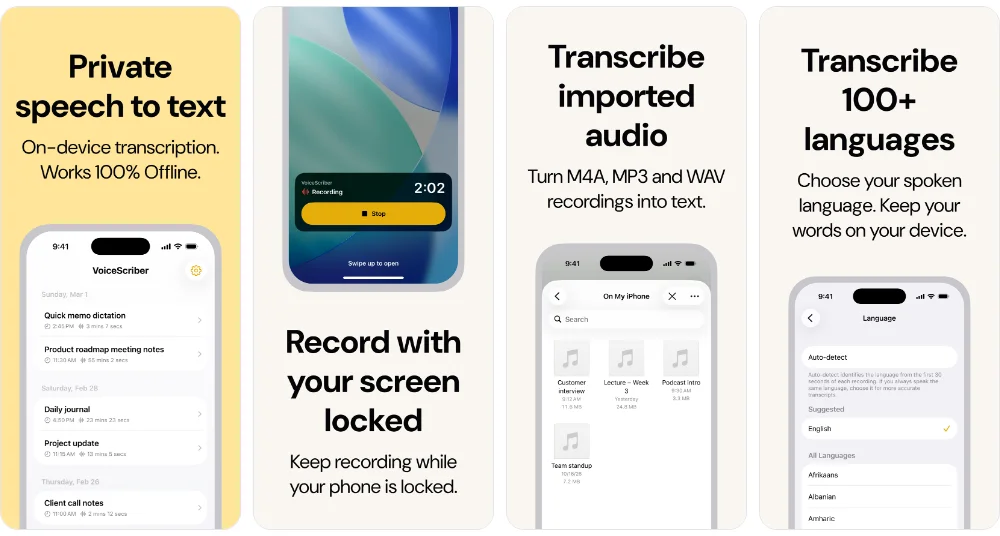
Quick Dictation: since version 1.9.0 you can start a recording from Control Center, the Lock Screen, the Action Button (iPhone 15 Pro and later), Back Tap or Siri ("Dictate with VoiceScriber"). The app opens already recording; when you tap Stop it transcribes on the iPhone and copies the text to paste into another app. It isn't a keyboard or live dictation. The copied text doesn't sync to a Mac through Universal Clipboard, clears from the clipboard after 10 minutes and is also saved as a note. See the Quick Dictation details.
Pricing: free to download and try; Weekly US$5.99 or Lifetime US$49.99 one-time. Prices may vary by country.
Caveat: on-device processing reduces exposure but is not a compliance certification. Device security (passcode, backups, shared exports) still matters.
Most private on desktop: Handy
Best for: Windows, macOS or Linux users who want local dictation without sending everyday audio or transcripts to a service.
Key security facts: Handy's privacy policy says it needs no account and that during ordinary transcription it doesn't send microphone audio or transcripts to Handy's servers. You can delete history entries, shorten retention or set the history limit to zero. Optional cloud post-processing is off unless you configure and use it, and then it sends the transcript to the provider you chose.
Pricing: free and open source.
Caveat: by default Handy keeps recent history entries with their audio, adds no app-level encryption to local files, and checks for updates and downloads models over the network (without audio). Uninstalling may leave its data folder behind. For more on local models, see how to transcribe audio offline with Whisper.
Enterprise cloud with compliance programs: Microsoft Azure AI Speech
Best for: enterprises that need speech APIs, regional deployment, central administration and a documented cloud security program.
Key security facts: Audio and transcription logging is off by default, and enabled logs are kept for 30 days. Microsoft says real-time audio is processed in server memory and not stored at rest, while batch transcription output may be stored in Microsoft storage unless you specify your own. Disconnected containers can run without internet, but only after an approved access request.
Pricing: a free tier plus usage-based paid options; see Azure Speech pricing.
Caveat: standard API calls use the cloud, so confirm the service scope of any compliance program for your configuration.
Enterprise cloud with AWS controls: Amazon Transcribe
Best for: organizations already on AWS that want IAM policies, encrypted storage and their own S3 buckets for transcripts.
Key security facts: Transcribe uses TLS 1.2 in transit and server-side encryption for transcripts in your S3 bucket, with the option of your own KMS key. Its AI service card says Amazon may use customer content to improve the service, and that customers can opt out through AWS Organizations.
Pricing: usage-based; see Amazon Transcribe pricing.
Caveat: set the service-improvement opt-out and S3 lifecycle rules before processing sensitive audio; this is not an offline service.
Healthcare: contracted clinical dictation
Best for: clinical teams that need a healthcare-specific, centrally administered dictation workflow.
Key security facts: Dragon Medical One is a cloud-connected clinical dictation service with regional data centers in the US, UK, Canada, Australia, France, Germany and Switzerland. Its public documentation doesn't spell out retention or training terms, so buyers should get them in writing. The HHS cloud computing guidance explains when a Business Associate Agreement is required.
Pricing: quote-based through Microsoft or an authorized reseller.
Caveat: a product built for healthcare isn't automatically right for your HIPAA obligations; confirm the BAA and configuration first. Our guide to HIPAA-compliant voice-to-text apps covers the options.
Legal: local transcription with controlled exports
Best for: lawyers and legal teams who need to limit exposure of client interviews, case notes and privileged discussions.
Key security facts: an on-device app avoids sending the original recording to a transcription server: VoiceScriber does this on iPhone, Handy on a computer. The firm still has to control device access, exports, backups, retention and consent to record.
Caveat: local transcription doesn't by itself establish privilege, admissibility or compliance with the firm's information-handling rules. Read secure offline transcription for lawyers before choosing a workflow for client matters.
Meetings and AI note takers: Fireflies.ai, Otter.ai and Notta
Best for: teams that need searchable meeting records with sharing controls and retention policies, or a local mode for sensitive meetings.
Key security facts: Fireflies says it does not use meeting data to train AI models, states SOC 2 Type II, TLS in transit and AES-256 at rest, and offers a BAA on Enterprise plans with Private Storage. Otter states a SOC 2 Type 2 report and AES-256 server-side encryption, while its privacy policy describes training on de-identified recordings and transcripts. Notta's desktop Privacy Mode (beta, Mac and Windows) transcribes on the computer and works offline after setup, unlike Notta's regular cloud workflow.
Pricing: all three have free plans. Otter Pro is US$8.33 per user per month billed annually, and Notta Pro is US$8.17 per month billed annually; Fireflies charges per seat on paid plans.
Caveat: meeting bots, connected calendars, shared workspaces and AI summaries add access paths, so confirm consent, sharing defaults and the processing mode before inviting a note taker. Compare private offline meeting transcription and offline alternatives to Otter.
Is voice data stored securely on smartphones?
Sometimes. It depends on the device, language, app and settings, and a phone's built-in microphone feature doesn't guarantee that everything stays on the phone.
- iPhone Dictation: Apple says Dictation is processed on the iPhone in many languages without internet, and its privacy notice says other configurations send what you say to Apple. Our guide to whether iPhone Dictation works offline explains the difference.
- iPhone Voice Memos: recordings sync through iCloud when that setting is on. Recording on a phone and keeping audio only on that phone are different promises.
- Android and Gboard: advanced voice typing on Pixel 6 and later keeps dictated text on the device, except when features like Fix it or detailed edits send text to Google. Gboard's audio donations are voluntary and send audio snippets to Google, which keeps them for up to 18 months.
- Pixel Recorder: transcribes on the device and works without a Google Account, while optional backup and sync saves recordings to your Google Account.
On any phone, check the passcode, system updates, microphone permissions, cloud backups and where you share the result. Those controls matter even when transcription itself is local.
How to verify a vendor's security claims in 10 minutes
These steps help you spot missing evidence before uploading a confidential recording. Use non-sensitive audio for any test.
- Find the trust center or security page. Look for processing location, encryption, identity controls, incident response and independent reports. If SOC 2 or ISO 27001 is mentioned, ask for the report or certificate and check its scope and dates.
- Read the privacy policy and DPA. Search for audio, transcript, retention, subprocessors, deletion, training and international transfers. For healthcare, confirm the vendor will sign a BAA for the specific service.
- Check the store privacy label for mobile apps. Open the App Store or Google Play listing and read the data disclosures. A label shows what the developer declares; it can't prove how every file, backup or export is handled.
- Find the retention and training settings. Check whether audio is stored by default, how long deleted files sit in Trash or backups, and whether training is opt-in or opt-out. For enterprise plans, confirm administrators can enforce these settings.
- Check offline claims in Airplane Mode. Finish installation and model downloads first, disconnect all networks, then record or import a short sample and transcribe it. Note whether summaries, login or exports behave differently; a local transcript doesn't prove every feature is offline.
If a vendor can't answer a question your policy depends on, write it down as "Not disclosed" rather than assuming the control exists.
Bottom line
Choose local transcription when the main requirement is not uploading confidential audio. On iPhone, VoiceScriber offers that workflow; on a computer, Handy and Notta's Privacy Mode are documented local options with different account and storage arrangements.
Choose a cloud provider when your organization needs managed identities, shared access, regional controls and formal contracts. Azure AI Speech, Amazon Transcribe and Google Cloud Speech-to-Text document those controls, but the right choice depends on configuration and the actual agreement. No badge or offline claim replaces checking what happens to recordings, transcripts, backups and exports.
FAQs
Which speech-to-text software is the most secure?
No single tool is the most secure for every situation. If confidential iPhone audio must not be uploaded for transcription, VoiceScriber is an on-device option that works offline after installation. That reduces exposure, but it is not a security certification. Regulated enterprises may also need contracts, audit reports and administrator controls that only a managed cloud service provides.
Is cloud speech-to-text safe for confidential recordings?
It can be, if the provider's processing location, retention, training policy, encryption, access controls and contract meet your requirements. Microsoft Azure AI Speech, Amazon Transcribe and Google Cloud Speech-to-Text document enterprise security controls, but they still need correct configuration and due diligence. Do not upload material whose handling rules forbid third-party processing.
Which dictation app works offline for confidential documents?
On iPhone, VoiceScriber records audio, transcribes it on the device after you tap Stop and copies the text so you can paste it into another app. It is not a live dictation keyboard. On a computer, Handy transcribes locally, and Notta's desktop Privacy Mode (in beta) can transcribe offline after setup. Confirm each app's exact mode before using sensitive content.
Do transcription apps use my audio to train AI?
Policies differ. Amazon says Transcribe may use customer content to improve the service unless the customer opts out. Otter's privacy policy describes training on de-identified audio and transcripts. Fireflies says it does not use meeting data to train AI models, and Google Cloud Speech-to-Text does not log audio or transcripts unless you opt in. Always check the terms for your plan.
What does SOC 2 mean for a transcription app?
SOC 2 is an independent report on a service provider's controls for areas such as security, availability and confidentiality. A Type II report tests those controls over a period of time. It does not promise that every recording is safe, that the app is HIPAA compliant or that your own settings are correct. Ask for the report's scope, dates and exceptions.
Is voice data stored securely on my smartphone?
It depends on the app and settings. Apple Dictation processes speech on the iPhone in supported languages, while other configurations use Apple servers. Pixel Recorder transcribes on the device, but optional backup and sync stores recordings in your Google Account. Passcodes, backups, copied text and shared exports all affect privacy, so on-device transcription is only one part of smartphone security.
Which speech-to-text is best for security-conscious, regulated enterprises?
Start with Microsoft Azure AI Speech, Amazon Transcribe or Google Cloud Speech-to-Text if you need managed cloud infrastructure, identity controls and formal agreements. Compare their logging defaults, training settings, retention and support for a DPA or BAA where required. The right choice depends on your compliance obligations and architecture, not on a single badge.
Which on-device speech-to-text is best for transcribing confidential meetings?
For in-person meetings recorded on iPhone, VoiceScriber records and transcribes on the device without uploading the audio, with recordings up to 90 minutes. On a computer, Handy and Notta's desktop Privacy Mode offer local processing. Before recording any meeting, confirm everyone's consent, device protection, backup settings and how the transcript will be shared.
Sources
All sources checked on November 14, 2026.
- VoiceScriber: App Store listing and product facts.
- Apple: Dictate text on iPhone, Siri, Dictation & Privacy and Voice Memos iCloud.
- Google: Gboard advanced voice typing, Gboard audio donations, Pixel Recorder data handling, Recorder backup and sync, Cloud Speech-to-Text data usage FAQ, data logging and Google Cloud HIPAA.
- Microsoft: Azure Speech data privacy and security, audio and transcription logging, disconnected containers, Speech pricing and the Dragon Medical One administration guide.
- AWS: Amazon Transcribe AI service card, data encryption and pricing.
- Vendors: Handy privacy policy, Otter privacy and security, Otter privacy policy, Fireflies security, Notta Privacy Mode and Notta security.
- Standards: NIST least privilege, ICO encryption, ICO controller-processor contracts, AICPA SOC 2, ISO/IEC 27001 and HHS HIPAA and cloud computing.